
The success of your business depends on how quickly you recover from falling behind your competitors, and technological advancements are proof of that. Companies that adapted to new technical changes have thrived, while those that followed traditional methods have slowly declined in growth.
In the digital age, if you fail to adopt technical shifts such as accounts payable automation, your business may never grow. Some businesses still fall behind even after using automation in their workflow because they are unaware of accounts payable automation best practices.
In this blog, we will explore the 15 best practices of accounts payable (AP) automation that will help you ease the financial workload of your business.
📌 Key Takeaways
- Accounts payable automation uses tools or software to automate the entire accounts payable workflow.
- Using digital invoices and implementing three-way matching are among the top accounts payable automation best practices.
- AP automation improves overall business efficiency by reducing costs, speeding up processing, and increasing accuracy.
What Does AP Automation Mean?
Accounts payable automation refers to the use of software or digital tools to simplify the accounts payable process. From receiving invoices to approving them and releasing payments, it includes everything.
Automated AP processes differ significantly from traditional accounts payable processes. Automation eliminates manual data entry and speeds up the entire AP process.
OCR (Optical Character Recognition) invoice processing is a prime example of accounts payable automation, which speeds up the invoice creation process with automated invoice scanning and uploading.
In simple words, accounts payable automation means transforming your slow, paper-heavy workflow into a fast, accurate, and real-time workflow.
15 Accounts Payable Automation Best Practices
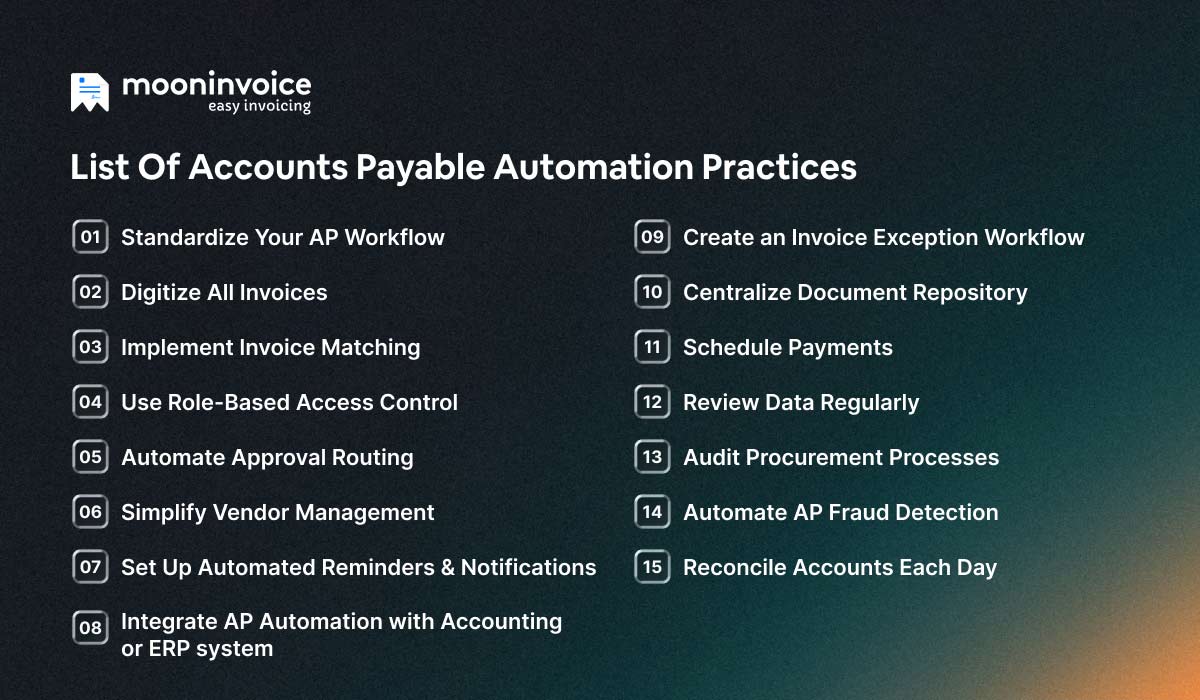
Now that we have understood what AP automation is all about, next, we will look at the best practices in the accounts payable process.
1. Standardize Your AP Workflow
The foundation of a successful accounts payable automation starts with standardizing the accounts payable workflow. Before selecting any software, first, you need to set a repeatable process starting from invoice receipt to approval and payment. This process will ensure the automation works correctly without any errors.
When the same process is followed consistently, the risk of errors decreases, making the entire AP cycle faster and more predictable.
Still Processing Invoices Manually?
Every delay, every mistake, and every late payment is costing you more than you think. Let Moon Invoice help you streamline your AP process with automation.
2. Digitize All Invoices
Switching from paper to digital invoices reduces processing delays. When you receive an invoice in digital formats such as PDFs, e-invoices, or scanned copies, it becomes easier to extract data using quick-scan-enabled tools. Key invoice details such as vendor name, invoice number, date, and total amount are recorded without any manual effort.
To improve accounts payable efficiency, use digital invoices that offer better traceability and faster approvals.
💡Pro Tip:
Ask your vendors to share electronic invoices. Later, use OCR invoice processing or quick-scan-enabled tools to store documents in a centralized system. This reduces paper usage and ensures a smooth AP process.
3. Implement Invoice Matching
To keep your accounts payable process error-free and financially accurate, consider implementing invoice matching. There are three types of invoice matching: two-way, three-way, and four-way. Among the three types, the most effective one is three-way invoice matching. It checks the purchase order (PO), goods received note (GRN), and invoice sent by the vendor. Invoice matching prevents businesses from overbilling, duplicate payments, and vendor fraud.
Selecting AP automation software that offers invoice matching is a cornerstone of accounts payable invoice processing best practices, as it speeds up approvals and ensures financial accuracy by eliminating mismatches.
4. Use Role-Based Access Control
Implement Role-based Access Control (RBAC) in your business workflow to authorize team members to view, edit, and approve specific accounts payable tasks. Using RBAC reduces the risk of unauthorized payment processing and separates duties within finance teams. You can control who can do what, restrict access by job role, and track user activity for audit purposes.
Role-based access control ensures transparency and accountability across the entire accounts payable operations.
5. Automate Approval Routing
Invoices move through the approval process quickly and accurately when approvals are routed properly to the right person in charge. When businesses depend on manual processes or completely rely on email threads, invoice approvals get affected. But when approvals are routed in the right order, such as approvers based on amount threshold, vendor type, the invoice gets approved faster.
Automated routing plays a major role in creating a clear audit trail and faster payment cycles.
💡Pro Tip:
Set approval paths based on different invoice categories. For example, one person should handle invoices from service providers, while another should manage invoices from vendors delivering goods.
6. Integrate AP Automation with Accounting or ERP system
This is one of the most impactful accounts payable automation best practices where you integrate your AP automation workflow with either an accounting software or ERP system. When a tool or software is used for accounts payable automation, the data flows automatically and ensures every transaction stays accurate.
This integration minimizes reconciliation issues and improves the business’s cash flow.
7. Set Up Automated Reminders & Notifications
Automated reminders and notifications are a key part of any business. These reminders help you stay ahead of your finances by reducing missed payments. Manual follow-ups or calendar notes could slip up when you don’t notice them, whereas modern AP automation solutions send alerts for pending approvals, upcoming due dates, and exceptions.
A tool with a well-configured reminder system ensures high-priority invoices receive immediate attention.
8. Simplify Vendor Management
Vendor management is necessary to ensure a smooth accounts payable process. Here, key vendor information, including name, address, tax details, and bank credentials, is recorded for future use. Keeping records makes it easier to make payments, match financial documents, and reduce errors. An automated system can speed up the accounts payable process when vendor data is managed properly.
With effective vendor data management, AP automation works with maximum accuracy as data inconsistencies won’t disrupt validation workflows.
9. Create an Invoice Exception Workflow
When you automate invoice processing and AP workflows, establishing clear invoice exceptions is equally important. Exceptions such as mismatched purchase orders (POs) and invoices, missing PO numbers, or incorrect vendor details can derail the accounts payable cycle if not handled properly. When a structured process with defined rules is followed, exceptions can be resolved quickly.
It is another accounts payable invoice processing best practices where the approval workflow is more responsive, delays are minimized, and the reliability of the automated AP system improves.
How to do it?
Prepare a list of exception categories, assign approvers for each type, and set automated exception flow for mismatches. Later mismatched invoices should be handled by another person and focus on resolving them as soon as possible to ensure a smooth invoice processing.
10. Centralize Document Repository
A centralized document repository ensures every financial document, such as invoices, purchase orders, receipts, etc, is stored securely in one place. It strengthens the internal control of your business by reducing unauthorized access and version confusion. Creating a centralized system helps in retrieving documents quickly during audits, reconciliations, or vendor inquiries instead of juggling with hundreds of files.
It keeps the accounting system organized and promises complete accuracy across financial records.
💡Pro Tip:
Create cloud storage (e.g., Google Drive) to securely store all documents and control who can access each file. Then, sync your AP and accounting tools with the cloud storage to manage documents seamlessly.
11. Schedule Payments
Payment scheduling is another accounts payable best practice that improves your accounts payable workflow. It helps you manage your cash flow as you get to know exactly when and how invoices should be paid. Instead of rushing the processing of payment in the last minute, focus on scheduling payments that allow AP teams to prioritize invoices based on discount, vendor terms, etc.
Scheduled payments are one of the best ways to build long-term trust. By scheduling payments, you ensure your vendors are paid on time and gain better control over outgoing cash.
12. Review Data Regularly
Keep an eye on your accounts payable data and track KPIs (key performance indicators) to make sure the cash flow of the business is always checked. It helps identify any major issues and common mishaps. In accounts payable workflow, KPIs such as invoice cycle time, early payment discounts, and cost per invoice give clarity to business owner about their team.
It becomes easier to make data-driven decisions and optimize workflows when KPIs are tracked, and AP data is reviewed regularly.
13. Audit Procurement Processes
Auditing your procurement process means you are checking whether the AP workflow aligns with purchasing policies, contract terms, and budget constraints. Regular audits help fill the compliance gaps, identify inefficiencies, and unauthorized purchases. To audit procurement processes effectively, you can consider using accounts payable automation software. It will track every purchase order, receipt, and invoice digitally and resolve discrepancies faster.
Regularly reviewing procurement activities strengthens internal controls and ensures supplier obligations are met.
💡Pro Tip:
Review procurement activities weekly or monthly. Verify purchase orders, compare spending trends, and ensure every transaction is approved in accordance with company policy.
14. Automate AP Fraud Detection
To protect your business from suspicious activities such as duplicate invoices, inflated charges, vendor fraud, or unauthorized vendor changes, use an automated software to detect these fraud early. The software will detect mismatches in total amounts, unusual payment terms, or duplicate invoice numbers and help you avoid fraud activities.
It reduces the risk of internal or external fraud and allows teams to investigate the matter before making payments.
15. Reconcile Accounts Each Day
Reconciling accounts with the help of automation aids your AP process . In a worst-case scenario, if you are required to make an additional payment to the vendor that is not recorded, your books won’t match the bank data. This can make a huge impact on cash flow. Also, it indicates poor bookkeeping practices.
Daily reconciliation catches errors early, prevents unexpected cash shortages, and ensures your financial records stay accurate, reliable, and audit-ready.
💡Pro Tip:Use tools or software that simplify the accounts reconciliation process. Review your AP workflow regularly, gather feedback, and address issues promptly to keep AP operations streamlined.
Importance of AI-Powered AP Automation in Businesses
Now that we have understood the best practices of AP automation, you must be wondering whether AI will play a role in the future. Why is AI-powered AP automation crucial? Let’s unfold this in detail.
In the modern age, manual AP processing isn’t the most preferred option. In fact, it is among the least preferred compared with automated or AI-powered AP solutions. Manual AP processing comes with many challenges that AI-powered AP automation addresses more easily.
To clear all the confusion, here are the benefits of using AI-powered AP automation over manual processes:
- Cost Efficient: AI-backed technologies reduce processing expenses, labor costs and bring more value to the business.
- Faster Processing Time: Automated AP process helps validate invoice data quickly, which ultimately accelerates the entire workflow, i.e., from receiving invoices to getting paid.
- Higher Accuracy: Compared to manual AP processing, AI-powered AP has much better accuracy as it reduces errors, and invoices are matched against PO and GRNs (Goods Received Note).
- Enhanced Data Visibility: Real-time insights into spending patterns, vendor performance, and flaws that need correction.
- No Room for Fraud or Duplication: AI-powered AP automation helps identify suspicious patterns and unusual payment requests, which keeps transactions secure.
Slow Invoice Approvals Hurting Your Cash Flow?
Automate your AP process and take control of your finances.

AI-powered Invoicing
Accurate Tax Reports
Automated Reminders
Why Choose Moon Invoice for AP Automation?
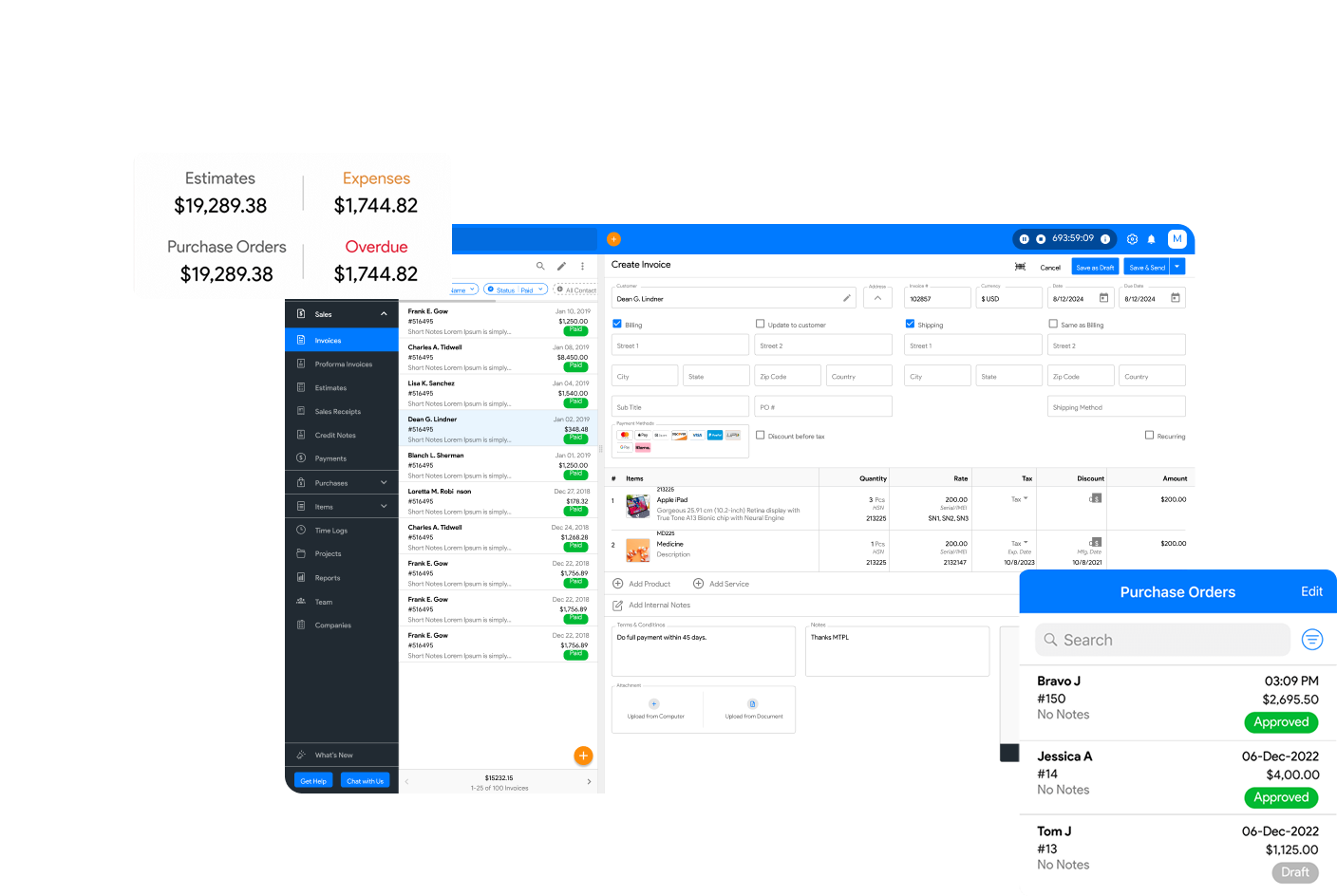
To transform your accounts payable process, you need a solution like Moon Invoice, which offers AI-powered automation as well as other necessary features such as payment tracking, alerts, and financial reports creation, all within one platform.
You can speed up approvals, eliminate paper-based processes, and stay ahead of vendor payments. Here are some of the key features of Moon Invoice:
- AI-powered Quick Scan: Scan paper-based expense receipts and save them as digital documents.
- Seamless Integration: You can easily integrate payment gateways and third-party apps to ensure a smooth accounts payable process.
- Real-Time Payment Tracking: View the status of every invoice, i.e., paid, pending, or overdue; all in one centralized dashboard.
- Automated Reminders: Get instant alerts for due payments, pending approvals, and missed payments.
Conclusion
Automation is more than what we just see. If used in the right way, it can transform the entire accounts payable process of a business. The time required to process payments can be significantly reduced without errors or discrepancies. As the world is moving towards AI-powered technologies, it is almost certain that the use of manual processes will only decrease in the coming years. This is why you should adapt to automation as soon as possible.
The points mentioned above are some of the best practices in accounts payable process using automation. From payment tracking to invoice matching, automation acts as the missing piece of the puzzle.
So, are you looking for a solution that can help you ease up the AP workload and manage processes smartly? You are at the right place.
Check out Moon Invoice and start your free trial today!
FAQs
What is accounts payable automation?
How does accounts payable automation work?
What are the major benefits of accounts payable automation?
How does automation help optimize the accounts payable process?


We at Moon Invoice, are the best minds behind smarter invoicing and seamless business growth. We love to solve financial problems and keep providing effective tips through our blogs, newsletters, and social media channels. As a team, we continue exchanging ideas about growing financial challenges and smart use of automation tools.