![QR Code Menu: How to Create a Contactless Menu [A Complete Blueprint]](https://mi-blogs.s3.amazonaws.com/mi-live/blog/wp-content/uploads/2025/12/15112114/QR-code-menu-feature-imag-01.jpeg)

That’s right. A little black-and-white square, which you invite your guests to scan for the digital menu, has been the driving force behind the revenue. Ditching the physical menus and embracing a digital QR code menu for restaurants was not that easy, but the COVID-19 pandemic turned the tables for restaurant owners.
In the past few years, it gained momentum and left restaurants with no choice but to go for a contactless QR code menu. Today. It actually benefits restaurants, cafes, bars, and pubs with far better sales than what the traditional menu offers.
Obviously, because everyone wants to avoid direct contact with reusable items amid growing health concerns. Therefore, it makes complete sense to use QR codes and level up the guests’ dining experience.
Continue reading to know its meaning, benefits, and what does mp mean on a menu.
What Is a QR Code Menu?
In plain English, a QR code menu is a small black-and-white square your guests scan with their phone camera to view the full menu instantly. It can be placed anywhere on the table, wall, or check presenter to let guests check available items in a contactless manner. This QR-code digital menu aims to replace paper-based menus, which often raise health concerns.
How Do I Create a QR Code for a Menu?
While some may expect you to be a tech genius, others give full, end-to-end support for creating a QR code. Here, we will focus on the latter and guide you on how to create a QR code using comprehensive POS software.
1. Get an Online QR Code Maker
Conduct an online search to pick the best QR Code maker that aligns with your store’s requirements. Check out its features, know how long it takes to generate a QR code, and whether it has multiple payment options.
Nowadays, there are many software that give you invoicing, along with POS billing, so that you don’t spend extra dollars. You can create & accept orders using a QR code, issue an invoice, collect the payment, and dispatch the receipt in a single platform.
2. Create a QR Code
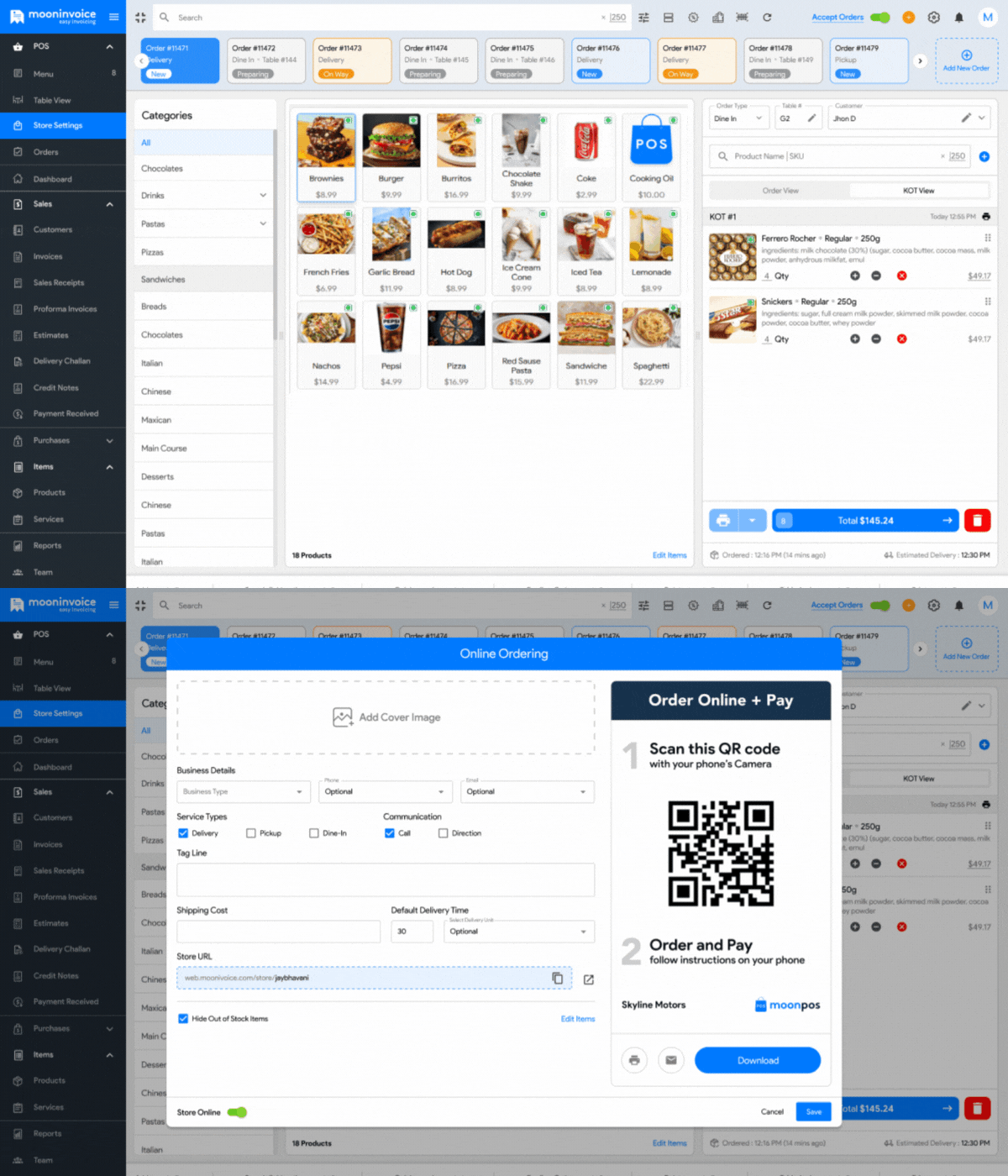
Assuming you have already implemented reliable software, let us explain to you how to create a QR code on sophisticated POS billing software.
- Log in to the POS software.
- Enter the POS module and find ‘Store Settings’.
- Fill in the necessary details.
- The system will automatically give you a unique QR code.
- You can even find a web URL to enable online shopping.
Notably, you can make changes, including shipping cost, delivery time, and tag line, anytime you want. You can even choose to show or hide the phone number and email address.
3. Download & Start Using
If you see the QR code is ready, all you need to do is follow the instructions on your screen. You can select to download, email, or take a printout as per your store’s requirements.
Later, display the QR code where guests first enter or sit, so they can scan and open the digital menu instantly. For online buyers, you can copy and send a URL, so they can place the order from a remote location as well.
Guests Walking Out Before the Menu Arrives?
Ditch the old menu books and replace them with QR code menus, so guests can quickly see what’s in store.
How Does a QR Code Menu Work?
Now that you know how to create the one, let us shift our focus to how it actually works.
1. Digitalize Menu
The store owner will prepare the online menu with tools or POS billing software. With this POS software, they can build an online web link (URL), which allows the user to scroll the menu on their smart device. That’s how, first of all, the restaurant or store owner needs to replace the traditional menu with a digital menu.
2. Make a QR Code
You can now create a unique QR code with the same POS software in a few steps. Once created, you can place this QR code on the table or get a printout to stick it on the nearby walls. Besides the online menu, this will also help you collect payment with QR code via multiple online payment methods.
3. Scan & Browse Menu
When the QR code is ready, your part is done. Now, let the guests scan it and browse their favorite items to fill the cart. Here, the QR code menu works in a way that neither requires waiting time nor waving down staff. They can take their time deciding what to order, just by using an elegantly designed online menu.
4. Place an Order
If the guests have made up their mind, lastly, they will place an order using the same web link (URL) from the QR code. This digital approach will help them place and confirm their order by paying the money upfront. This is how it works in a completely contactless manner, allowing guests to place an order conveniently without a physical touch.
Benefits and Challenges of QR Codes in Restaurants and Cafes
QR Code Benefits
Let us walk you through how black-and-white squares can actually benefit your business.
1. No Printing Costs
QR code aims to replace traditional paper-based menus, which further eliminates the need for recurring expenses. You don’t have to incur unnecessary costs on printing menu books or reprinting them following price revisions.
2. Contact-free Orders
Unlike physical menus, a QR code allows guests to access the store menu without any direct contact. So, there is no chance of unhygienic or unwashed hands passing bacteria-laden pages from one table to another.
3. Greater Accessibility
QR code-based menu allows your guests to open the full menu in just a few taps and check prices at their own pace. They have much better accessibility and time to make their choices with complete peace of mind.
4. More Number of Sales
Store menus, when accessed using a QR code, can uplift the sales numbers as more guests prefer viewing a menu on their smartphone. It does not force guests to wait until the menu arrives at the desk. They can simply explore the digital menu and place the order.
5. Exceptional Customer Experience
Offering a QR code menu elevates the customer experience as your guests can browse an elegantly designed menu with high-resolution images. So, their journey from browsing the food items to initiating the payment takes less time.
QR Code Challenges
Moving on to discuss some challenges that you may encounter while adopting QR codes.
1. Data-Security Anxiety
Security fear looms over owners willing to use QR code menus, as fraudsters might reroute guests to a phishing site or a possible data leak. QR code-based menus may steal important customer information and pass it to hackers.
2. Slower load times
Nobody wants to see that frozen screen, even for a fraction of a second. This could be due to an unstable internet or a low-grade POS system. Such things can affect your daily operations and may reduce product sales.
3. Complex Setup
Owners, especially those starting new restaurants or cafes, may struggle to set up a QR code menu. Generating a QR code and taking its printout couldn’t be easy for non-tech-savvy people. They may require additional help from experts.
4. Reliable Support
Every QR code user hinges on the support team when it comes to generating the code for the first time. They expect support from POS providers to alleviate the process of connecting the software and hardware. Traditional POS software, however, takes time to deliver on-demand support.
Generate a QR Code Painlessly
Let us take the hassle out of generating a QR code and boost customer satisfaction in a way that drives foot traffic.
Takeaways
QR-code menus are the default for millions of American dinners. But the real edge goes to restaurants that prioritize QR codes over traditional menus. Treat it as an extra server, not a replacement for staff, and guests will notice the difference. This move not only aims to grow customer satisfaction but also to bring up the sales numbers.
If you are planning to soon introduce QR-code menus in your store, well, we recommend trying Moon POS. This modern retail POS software will lessen your workload and improve sales numbers as well. Plus, you get a 360-degree view of your business activities to make the right decisions.
Questions Related to QR Code Menu
Why do restaurants change their menu every day?
Do I need any special app to scan the QR code?
Is it difficult to set up a QR code menu?
Can I update my digital menu anytime?



We at Moon Invoice, are the best minds behind smarter invoicing and seamless business growth. We love to solve financial problems and keep providing effective tips through our blogs, newsletters, and social media channels. As a team, we continue exchanging ideas about growing financial challenges and smart use of automation tools.