


Nowadays, businesses are shifting to digital spaces, and automated systems are the backbone of this change. With automation, it is easier to address common errors, inefficiencies, and the intricacies of manual processing. Automated billing systems are also a part of this change.
Automated billing redefines a new way how businesses handle payments. It helps you receive payments faster, which improves the business’s overall cash flow. Not only that, a vital part of the system, automated payment reminders, always keep you in the loop, so you don’t miss payments.
Now, the question is: do you know how an automated billing system works?
In this blog, we will explore what is automated billing system, its types, benefits, and core features, along with steps for setting up an automated billing system.
Let’s get started before wasting any time…
📌 At a Glance
- An automated billing system is designed to automate complex billing processes, such as invoice generation and payment tracking.
- Automated systems handle failed and delayed payments more effectively by automatically retrying and sending payment reminders.
- SMBs, subscription-based businesses, and utility service providers are among the top users of automated billing software.
- Benefits such as time efficiency, scalability, and consistent cash flow are the reasons why business owners switch to automated billing.
What is an Automated Billing System?
An automated billing system refers to a software-based solution that reduces the complex billing processes, such as creating invoices, tracking payments, and recording transactions, with the help of automation. It makes the entire billing method faster, error-free, and digitally organized.
Instead of creating invoices one by one, tracking due dates, and manually following up on overdue bills, the software helps you do it all with predefined rules. It reduces manual intervention and provides real-time insights, both of which are key to improving your business’s financial management.
How Does an Automated Billing System Work?
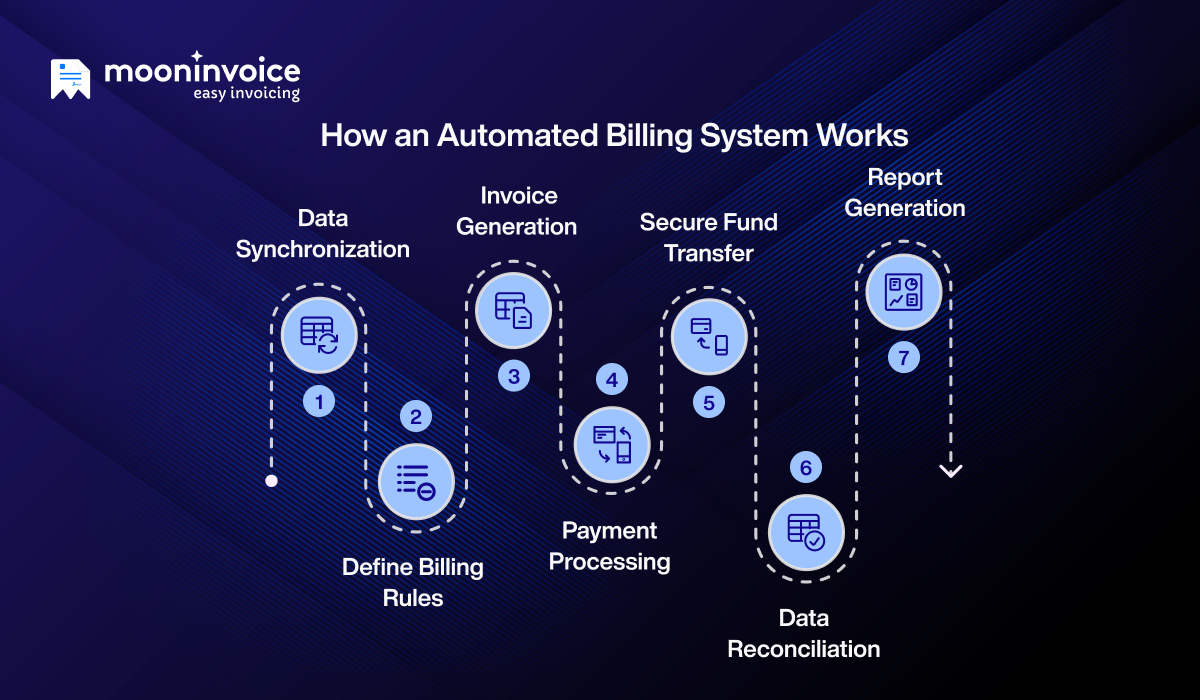
The primary role of an automated billing system is to manage a business’s entire billing cycle with minimal human involvement.
Let’s understand how an automated system works step by step:
Step 1: Data Synchronization
Automated billing systems are designed to integrate seamlessly with the company’s existing database or CRM tools. After integration, the billing software can automatically sync with existing customer details, such as name, billing address, contact information, and payment method.
This real-time synchronization ensures that any updates made in connected systems, such as customer profile changes or pricing adjustments, are instantly reflected in the system.
As a result, businesses avoid duplicate entries and maintain consistent, up-to-date billing records across all systems.
Manual Billing Becoming a Headache?
Turn your lengthy manual billing process into a quick, error-free, systematic process with Moon Invoice.
Step 2: Define Billing Rules
You can configure your billing rules based on your pricing model. This rule will determine when, how, and how much to bill customers.
Your billing logic may include:
- Fixed recurring charges (monthly or annual plans)
- Usage-based or consumption-based billing
- One-time fees or setup charges
- Discounts, promotions, or trial periods
- Late fees or penalties
Once these are defined, they apply automatically to every customer.
Step 3: Invoice Generation
This is the most critical process of an automated billing system. At the scheduled billing time, the system retrieves information from purchase records, subscription plans, and contracts and automatically creates invoices.
Every invoice includes:
- Itemized charges
- Billing period
- Applicable taxes
- Discounts, if any
- Terms and conditions
- Total amount due and due date
Using the automated billing system, invoices are generated in accordance with industry standards, reducing human error.
Also, the system calculates applicable taxes based on the customer’s location and local tax regulations. Taxes may include GST, VAT, service tax, or sales tax, depending on the business type.
Step 4: Payment Processing
Automated billing systems offer a variety of payment integrations. Once the invoice is generated, the system processes payments through integrated payment gateways, including credit and debit cards, ACH, Apple Pay, and digital wallets.
The system securely captures payment details, encrypts sensitive data, and verifies transactions in real time. After successful authorization, the payment status is automatically updated in the billing dashboard, and the transaction is recorded in the financial system. If a payment fails, the system can trigger alerts or notifications, allowing businesses to take timely action.
Step 5: Secure Fund Transfer
After successful payment authorization, the automated billing system ensures that funds are securely transferred from the customer’s bank to the business’s merchant account.
During fund transfer, sensitive financial information is protected using advanced encryption protocols. These security measures reduce the risk of data breaches, fraud, and unauthorized access.
Step 6: Data Reconciliation
Once funds are transferred and recorded, the system performs data reconciliation to ensure all financial records match across platforms.
The system automatically cross-verifies transaction details such as invoice numbers, payment amounts, taxes, processing fees, and settlement reports. If inconsistencies are identified, such as partial payments, duplicate transactions, or failed settlements, the system flags them for review.
Step 7: Report Generation
After transactions are processed and reconciled, the automated billing system compiles billing data into structured, real-time reports. These reports provide a clear overview of invoices issued, payments received, pending balances, failed transactions, and overall revenue performance.
Businesses can access dashboards that display key metrics such as monthly revenue trends, outstanding dues, customer payment behavior, and tax summaries. Many systems also allow customized reporting based on date ranges, customer segments, or specific billing categories.
The global subscription and billing management market is projected to reach $38.63 billion by 2035, growing at a CAGR of 15.94%.
Common Businesses Using Automated Billing Solutions
Businesses that prioritize accuracy, consistency, and timely payments most commonly use automated billing systems in their workflow.
Below are the businesses that use an automated billing solution:
1. Subscription-based Businesses
Streaming service providers, SaaS (Software-as-a-Service) companies, and membership platforms are among the largest users of automated billing software. These businesses manage large volumes of recurring customers, apply plan upgrades or pricing changes, and generate invoices automatically to ensure uninterrupted service and accurate billing cycles.
2. Small and Medium-sized Businesses (SMBs)
As SMBs expand, they handle increasing invoice volumes, customer records, and payment tracking. Instead of relying on spreadsheets or manual data entry, they adopt automated billing systems to simplify invoicing, track dues efficiently, and maintain organized financial records as they scale.
3. Utility Providers
Companies that provide electricity, gas, and water services rely on automated billing to calculate customers’ bills due to inconsistent consumption patterns. These systems are integrated with smart meters and connected devices to monitor usage in real time and generate bills based on actual consumption.
4. Healthcare Providers
Hospitals, clinics, and diagnostic centers process large volumes of patient data, insurance claims, and service charges daily. They use automated billing systems to organize treatment records, calculate insurance adjustments, generate accurate invoices, and maintain compliant documentation.
5. E-commerce and Retail Business
Online stores and retail businesses manage multiple product prices, taxes, shipping charges, discounts, and cross-border transactions. Automated billing systems calculate totals accurately, apply promotional rules, and update transaction records in real time, reducing errors and revenue leakage.
Benefits of an Automated Billing System
An automated billing system improves payment accuracy, reduces manual effort, and helps businesses streamline invoicing operations while maintaining financial control and efficiency.
Let’s explore some of the key benefits below:
- Time efficiency: Reduces administrative workload by eliminating repetitive manual tasks such as invoice creation, calculation, and follow-ups.
- Scalability: Manages increasing customers, invoices, and transactions without extra staff. It creates a flexible billing system that scales your business as it grows.
- Consistent cash flow: Automated invoice scheduling, payment reminders, and recurring charges help improve the overall cash flow of the business.
- Secure payment processing: Using advanced payment gateways and compliance standards ensures that sensitive financial data is protected and transactions are reliable.
- No human error: Automation helps reduce repetitive errors in manual processes. It ensures better accuracy and keeps your business on track to meet its goals.
- Improved customer experience: Timely notifications, accurate invoices, multiple payment options, and instant receipts help ensure a smooth customer experience.
Core Features of an Automated Billing System
Advanced billing systems resolve common day-to-day business hurdles. Many modern businesses are moving away from manual billing methods and adopting automated solutions to simplify operations.
Below are some of the top features to consider:
- AI-powered invoicing: Powered by AI, you can easily scan paper-based invoices and convert them into digital invoices within minutes.
- Automating recurring payments: Set up recurring payments once, and customers will be charged automatically for all future payments.
- Receipt generation: Once a transaction is complete, you can quickly create customizable receipts from a wide variety of ready-to-use receipt templates.
- Purchase order creation: Helps you generate purchase orders to clearly document the items, quantities, and agreed details requested from vendors.
- Tax compliance: Helps you create tax-compliant invoices that adhere to local tax regulations and avoid unwanted penalties.
- Financial reports: Provides real-time insights on customer behaviour, operational, and financial performance.
How to Set up an Automated Billing System?
Setting up an automated billing system is one of the smartest decisions for your business. However, it needs to be planned well to ensure a smooth transition from manual billing processes to an automated system.
The steps below explain how you can set up an automated billing system in your business workflow.
1. Evaluate Your Current Billing Needs
Even if you switch to an automated system, it is always good to review your existing billing structure. Identify what you are lacking, i.e., recurring issues or manual processes that take more time to complete.
For example, creating invoices one by one manually, listing all items, and performing calculations can be time-consuming. Automation can do it within seconds.
2. Choose Your Platform
Select a platform that suits your business operations, whether Android, iOS, Windows, or web-based platforms. The platform should be accessible to your team and compatible with your existing devices to ensure smooth billing management anytime, anywhere.
3. Integrate the System
Once selected, integrate the new billing system with your existing CRM tools, accounting software, or ERP platforms. Proper integration ensures that customer details, invoices, payment records, and financial data are updated automatically across all connected systems.
4. Enable Payment Methods
Connect payment gateways that are best suited for your customers so that they can make payments on time. Multiple payment options increase the chances of collecting payments before the due date. Add trusted payment methods such as credit cards, debit cards, ACH, PayPal, Stripe, or Apple Pay to simplify collections and improve payment success rates.
5. Testing and Staff Training
Before full implementation, test all billing processes, including invoice generation, payment processing, and reminders, to confirm everything works correctly. After successful testing, train your team to use the automated system efficiently for improved productivity.
Master Your Billing Like a Pro
Know exactly where your revenue stands at a glance with Moon Invoice.
Easy Invoicing
Payment Tracking
Financial Reporting
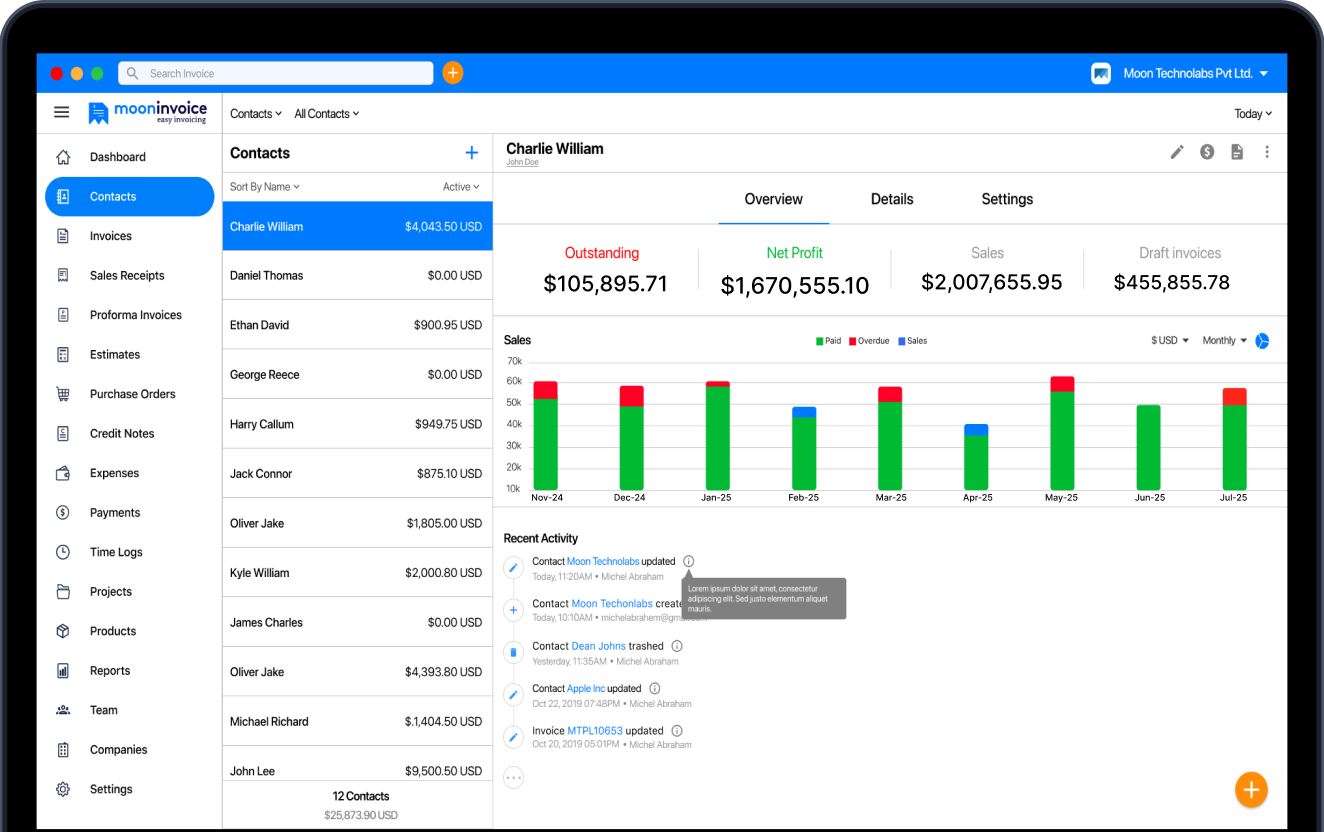
Automate Your Billing with Moon Invoice
Long story short: if your business is lacking an automated billing solution, you are running behind most of your competitors. And your struggle may never end if you keep using manual processes. In the current era, manually processing payments may hold you off for hours or days, which you can spend on other productive areas of your business.
On the other hand, when you use billing software such as Moon Invoice, your entire billing process improves. Firstly, it speeds up all of your invoice generation, payment tracking, and recurring billing processes. Secondly, it allows you to integrate third-party apps and over 20+ payment methods to your bills.
In addition to all these features, Moon Invoice also offers real-time financial reports, multilingual support, tax compliance, and cloud storage to make your billing process a breeze.
So, what are you waiting for? Start your free trial now!
Most Relevant Questions on Automated Billing Software
Who should use an automated billing system?
Will automated billing send payment reminders?
Can automated billing work on mobile devices?
Is automated billing safe?


We at Moon Invoice, are the best minds behind smarter invoicing and seamless business growth. We love to solve financial problems and keep providing effective tips through our blogs, newsletters, and social media channels. As a team, we continue exchanging ideas about growing financial challenges and smart use of automation tools.


