
Most of us hear “billing information” and think it is just an address and phone number printed on an invoice, but it is more than that.
Whether you are a business owner, CEO, or CFO, overlooking billing information as just a combination of an address and contact information may get you into trouble. If you enter incorrect billing information when issuing an invoice or bill, it will be very difficult to match payments and identify fraudulent activity. It could also lead to delayed payment collection and stagnant supplier relationships.
Irrespective of the billing method you use (digital or paper-based), you must add correct and up-to-date billing in order to get paid faster and maintain accurate records. If you are keen to understand what is billing info and what key information is required for billing, this blog is exactly for you.
Let’s explore all of these in detail…
📌 Key takeaways
- Billing information refers to the customer details used to process payments, verify transactions, and maintain records.
- Billing information generally includes customer name, billing address, phone number, and payment method.
- Billing information may vary based on the transaction type, such as online purchases or international payments.
- Most common billing information errors to avoid are using incorrect billing details and neglecting record audits.
What is billing information?
The billing information refers to the customer details required to process payments, create bills, and maintain accurate transaction records. In most cases, standard billing information includes the customer’s name, billing address, phone number, email address, and payment-related details.
Businesses collect billing information from customers to ensure the customer is genuine and all transactions comply with tax and regulatory requirements. When billing information is accurate, businesses find it easier to process refunds and resolve payment-related issues.
Are disorganized billing records creating unnecessary setbacks?
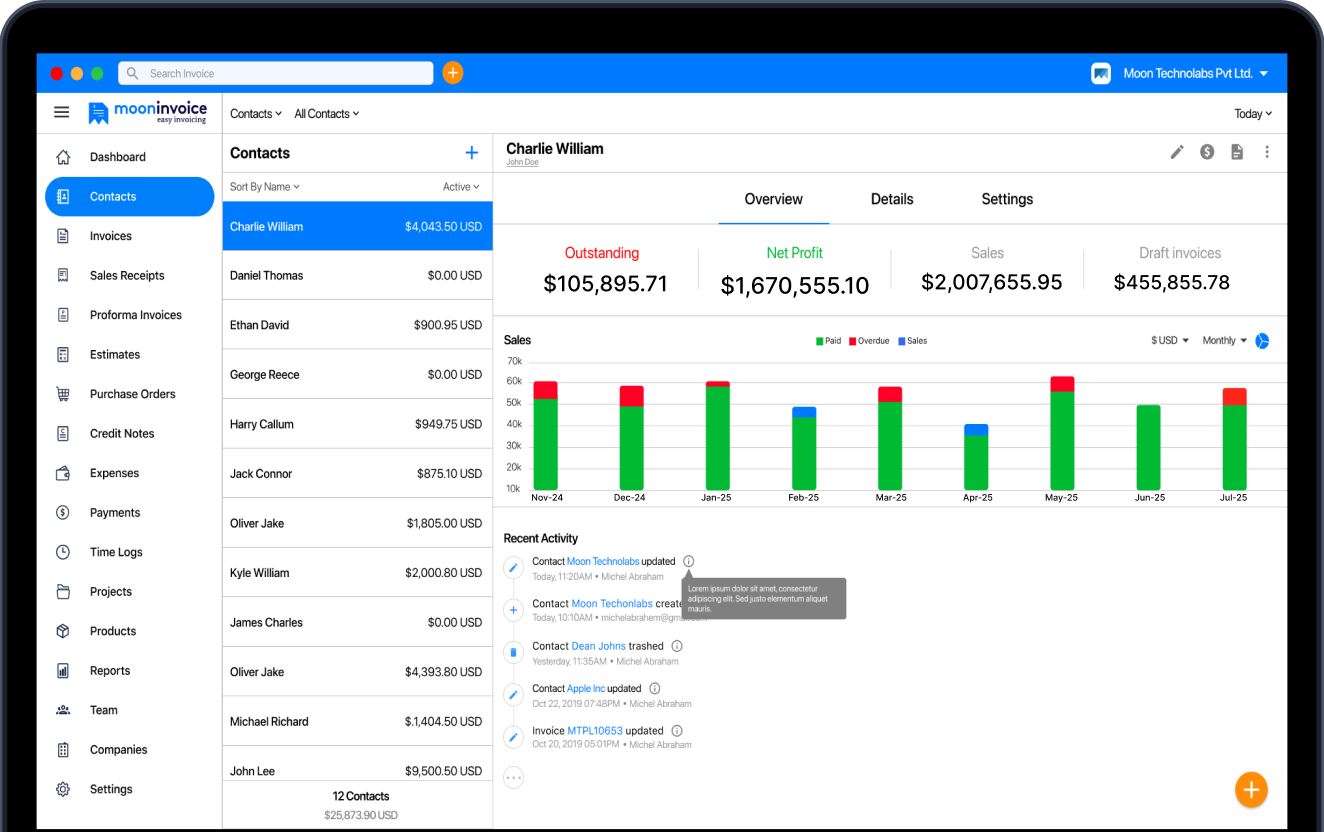
Switch to Moon Invoice, which helps you organize customer billing information, automate invoicing, and process payments faster.
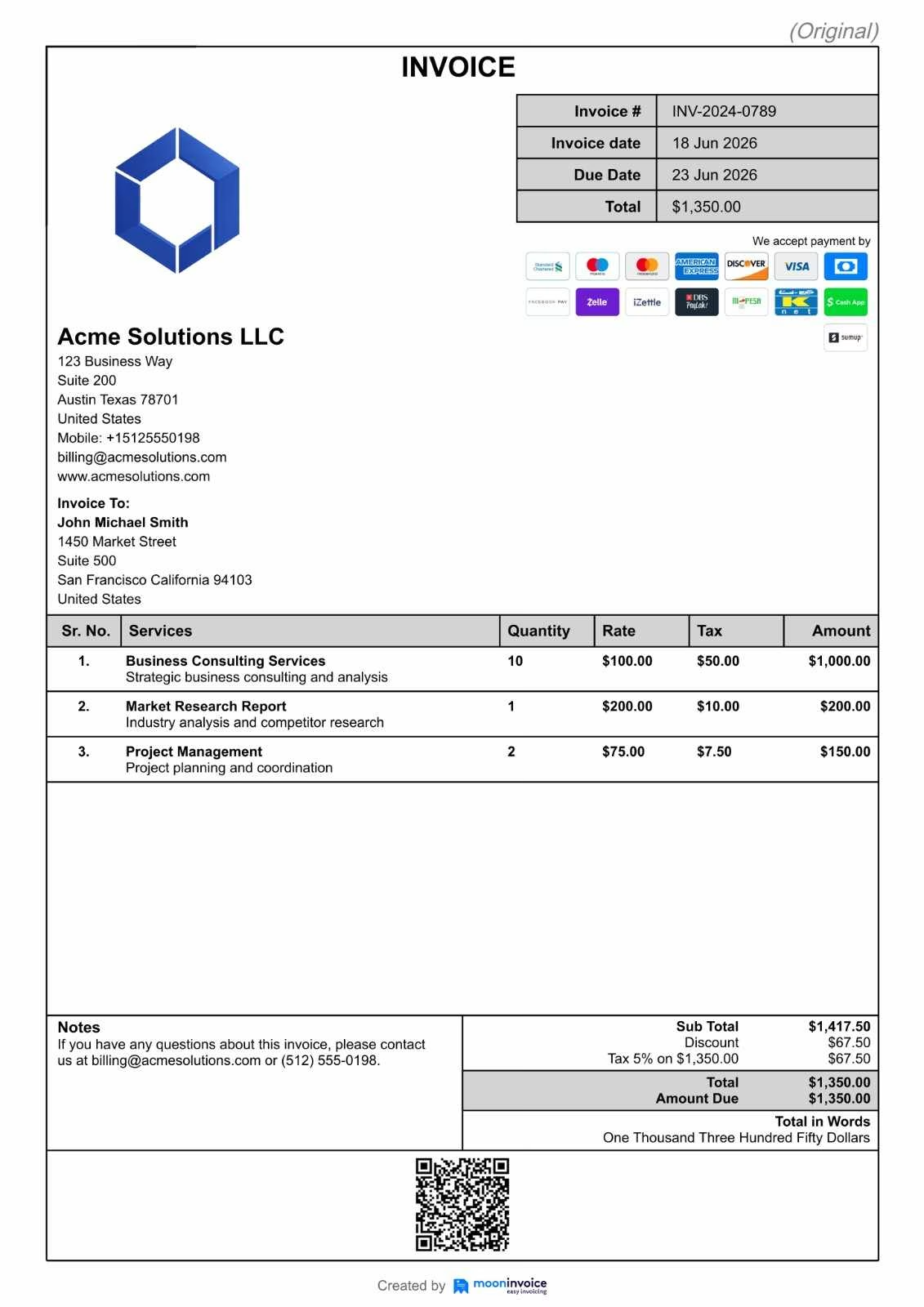
Standard billing information example
Suppose you are issuing an invoice to a customer named John Michael Smith, to whom you have provided some consulting and marketing services. Here’s how the billing information on the invoice would look:
Why is billing information important?
Billing information plays a vital role in keeping financial transactions accurate, secure, and hassle-free. The following points explain the importance of billing information for both businesses and customers.
For businesses:
- It is crucial for purchase order verification as matching billing details with purchase orders, and contracts helps businesses avoid discrepancies and payment disputes.
- Simplifies processing payments by verifying customer details immediately.
- Reduces fraud risks as payment providers authenticate transactions before approval.
- Billing information improves the accuracy of bills when accurate details are filled out and recorded.
For customers:
- Prevents payment failures or rejections as billing details are matched against the information present on the payment method.
- Protects customers from unauthorized transactions through billing verification and real-time checks.
- Customers get quicker refunds when purchases are returned or canceled if they provide the correct billing information.
- Gives them quick access to manage subscriptions, no need to update the address in every payment cycle when the information is correct.
- Ensures a smoother purchase experience for customers due to minimized payment-related errors or delays.
What information needs to be on a bill?
The billing information varies by transaction type. Some payments require only basic customer details, whereas others require all key information, along with additional details such as bank account information for verification and tax compliance.
Here are the different types of billing information required for different types of transactions:
1. Online purchases
When you shop online and make payments, businesses generally collect billing information to verify the entire billing process and transactions securely.
In online purchases, the following are the common billing details required:
- Customer’s full name
- Billing address
- Email address
- Phone number
- Payment method information (Credit/debit card, Apple Pay, etc)
- ZIP/postal code
Example:
Here’s a billing information example for online purchases:
| Elements | Information |
|---|---|
| Customer name | John Smith |
| Billing address | 1450 Main Street, Austin, TX 78701 |
| Email address | Johnatsmith@gmail.com |
| Phone number | (512) 555-1234 |
| Payment method | Visa ending in 7878 |
2. Subscription services
Subscription-based businesses or services require billing information for the initial transaction and all recurring payments.
Here, the common billing details required are:
- Customer name
- Billing address
- Email address
- Recurring payment method
- Subscription plan details
- Renewal preferences
Example:
Let’s assume a customer subscribes to an entertainment service provider for $55 per quarter. The billing information for the same will include:
| Elements | Information |
|---|---|
| Customer name | David Franklin |
| Email address | Davidatf@gmail.com |
| Subscription plan | Premium plan |
| Subscription amount | $55.00 |
| Billing cycle | Quarterly |
| Payment method | Master card ending in 5487 |
3. Business transactions
In B2B (business-to-business) transactions, additional billing information is required to smoothly process invoices, manage accounts, and create detailed tax reports.
In B2B transactions, the following are common billing details required:
- Business name
- Contact person’s name
- Business billing address
- Email address
- Tax identification number (TIN or EIN)
- Purchase order (PO) number (if applicable)
- Payment terms
Example:
Suppose an advertising agency or service provider sends an invoice to a client’s company for all the services provided. Here, the billing information in invoice will include:
| Elements | Information |
|---|---|
| Company name | ThinkBig Tech Solutions LLP |
| Billing contact person | Sorren Williams |
| Billing address | 250 Business Plaza, Chicago, IL 60601 |
| EIN (Employer Identification Number) | XX-XXXXXXX |
| PO number | PO – 8974 |
| Payment terms | 2/10 Net 30 |
4. International payments
Transactions between two countries require more detailed billing information than the standard ones due to currency conversion, banking regulations, and tax requirements.
Here are the common billing details required for international payments:
- Customer or business name
- Full billing address
- Country of residence
- Payment method details
- Currency preference
- Tax identification number (if applicable)
- International banking details (IBAN, SWIFT/BIC, etc.)
Example:
Let’s consider a U.S.-based company that pays a vendor located in the Netherlands. Here, the billing information will include:
| Elements | Information |
|---|---|
| Company name | Think&Thrive Enterprises |
| Billing address | New York, NY, USA |
| Vendor country | Netherlands |
| Currency | EUR (€) |
| IBAN (International Bank Account Number) | NL91ABNA1306253200 |
| SWIFT code | NL20INGB87 |
How does billing information work during payment processing?
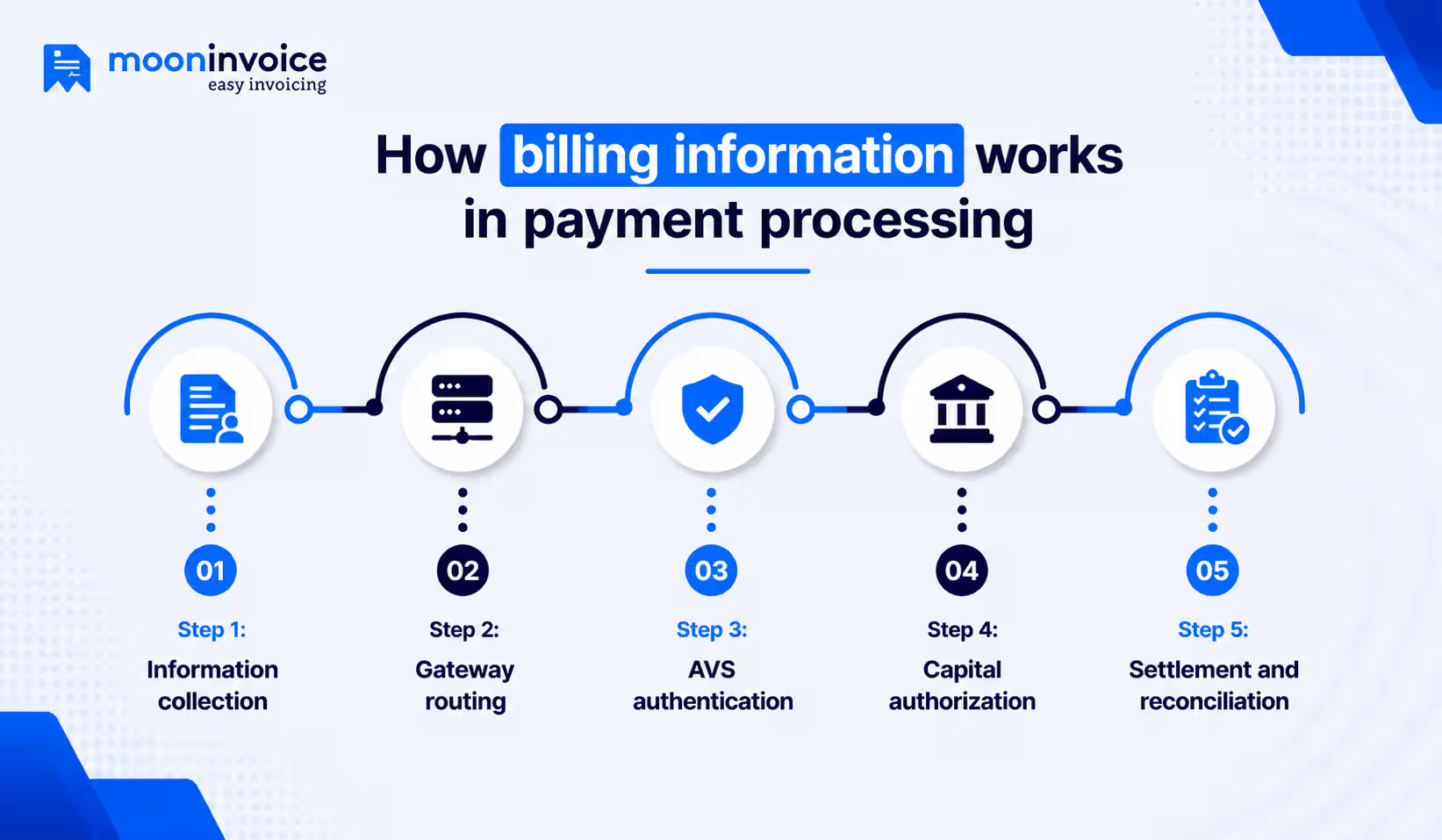
Beyond storing a customer record, billing information plays a key role in processing payments as well. The steps below explain how billing information works during payment processing.
Step 1: Information collection
Whenever the business wants to place a bulk order, they need to fill out important billing details in a bid to initiate the transaction. Now, this includes the company name, billing address, and a few of your card details. The system instantly encrypts or tokenizes this data before transmission.
Step 2: Gateway Routing
After all billing information is added, it is sent to a payment gateway such as PayPal or Stripe. The payment gateway validates your data formatting and routes the billing information to the merchant’s bank account provider.
Step 3: AVS Authentication
At this stage, the automated Address Verification System (AVS) comes into action. The issuing bank cross-references the submitted details with the records on file and returns an automated risk code. The business’s system evaluates this code and bids to immediately block suspicious transactions. It aims to filter out fraud before it results in a costly chargeback.
Step 4: Capital Authorization
Following the fraud check, the card network approaches the issuing bank, seeking its authorization to move funds. Thereafter, the bank issues an approval code and places a temporary “hold” on the funds, reserving them for the receiving party (merchant).
Step 5: Settlement and Reconciliation
Lastly, it’s all about settling the funds, a process that takes up to 48 hours or less. Which means the cash physically moves into the receiver’s bank account. On the merchant’s side, the accounting software then verifies the billing data, matches the incoming funds to an invoice, and reconciles the data in the ledger accordingly.
Smarter billing, zero manual hassles
Turn repetitive administrative tasks into a fast, accurate, and AI-driven workflow.
AI contact creation
Secure cloud storage
Multi-currency support
Common billing information errors to avoid
Businesses should avoid the following billing information mistakes to ensure accurate invoicing, smooth payment processing, and better customer experiences.
1. Incorrect billing details
Using incorrect customer names, billing addresses, or contact information can lead to failed payments and billing disputes. It is important to verify billing details before processing payments.
2. Failing to update customer records
With time, customers may change their billing addresses, phone numbers, and email addresses. Taking past records for granted and using old data may result in payment rejections and delays in collecting payments.
3. Identical billing and shipping address
Some businesses treat billing and shipping addresses as the same, which is, of course, a mistake. Businesses need to collect and store both addresses separately, as they serve different purposes.
4. Neglecting record audits
Most businesses collect billing information once and then fail to review it. This can create unresolved data entry errors, duplicate customer information, and even unnoticed outdated records. To maintain accurate financial transactions, businesses must regularly review billing records.
Manage your bills smartly with an AI-ready software
In day-to-day business transactions, billing information may feel like a small part of the payment process; however, it plays a crucial role in completing transactions. Whether it is about online purchases, subscriptions, or other types of transactions, it is key to maintaining accurate billing records and reducing delays.
Even if you are keeping those records clean, you might be wasting a lot of time manually adding billing information. But what if you can auto-populate those details? Believe it or not, Moon Invoice does that. The AI-powered billing & invoicing software securely saves customer (or vendor) details upon their first entry; the next time you select that same customer, all of their billing details are auto-populated.
That’s only the tip of the iceberg. With Moon Invoice, you even get advanced features like AI contact creation, AI image generator, and more. Start a free trial and explore them now.
FAQs on billing information
What does billing information mean?
How to fill billing information?
Where to enter billing information?
Why do companies ask for billing information?
Is billing information the same as payment information?


Jayanti Katariya is the founder & CEO of Moon Invoice, with over a decade of experience in developing SaaS products and the fintech industry. He holds a degree in engineering. Since 2011, Jayanti's expertise has helped thousands of businesses, from small startups to large enterprises, streamline invoicing, estimation, and accounting operations. His vision is to deliver top-tier financial solutions globally, ensuring efficient financial management for all business owners.