

Quick Read
An invoice for services rendered is a formal document issued to request payment for the completed work. Service providers such as lawyers, graphic designers, writers, and consultants use such an invoice. Professionals should clearly list the services offered, along with the applicable rates and hours, to improve clients’ understanding. Also, add payment terms and acceptable payment terms.
Creating an invoice for services rendered is an essential part of the billing process if you run service-based businesses. It keeps your cash flows active and maintains the company’s financial health up to the mark.
However, receiving on-time payment is only possible when your invoice is professionally designed and includes the correct elements. An unclear invoice can lead to confusion and late payment.
📌 Key Takeaways
- A service invoice is useful for service-based industries.
- A clear, professional-looking invoice not only enhances understanding but also helps boost on-time payment.
- Professionals should include all essential elements, such as the company name, customer name, an itemized list of services, the total payable amount, and payment terms.
- Companies can send a service invoice after the service is successfully delivered.
- An invoice for services is also useful as proof of performed work for tax purposes and other legal processes.
According to the Payments report, about 86% of businesses report that up to 30% of monthly invoices are overdue.
What Are Services Invoices?
Service invoices or invoices for services rendered are accounting documents that service-based organizations send to clients to request payment for the services provided. Service providers such as freelancers, consultants, IT & marketing firms use such invoices to request payment for the services they offer to clients.
Unlike product invoices that focus on unit price and quantity, the service invoices focus on the time spent on the work and the project fees. However, the purpose of both is the same: requesting payment.
These documents consist of the following elements:
- Service providers’ business name, address, and contact information
- Client’s name, address, and contact information
- Invoice unique number, invoice date & due date
- Currency
- Line item details of the offered services
- Payment terms
- Authorized signature
- Other terms and conditions
Tips to Write an Effective Invoice for Services Provided
To write a winning invoice, you must need to adopt the following tips:
- Use the invoice template to craft a professional, clear invoice.
- Always itemize the list of services for better understanding.
- Cross-check the invoice before billing for services rendered to ensure no errors are left.
- Never include irrelevant information.
- Mention the clear payment terms, Net 15, Net 30, etc.
- Include the payment methods on the invoice for the user’s convenience.
- Assign a unique number to each new invoice you create to make tracking easier.
- Always follow a professional approach when following up on unpaid invoices.
- Utilize invoice templates to create a professional and impressive invoice quickly.
Add Transparency to Every Invoice
Create an impressive invoice in 60 seconds with Moon Invoice and ensure timely payment.
How to Prepare an Invoice for Services Rendered? Step-by-Step Guide
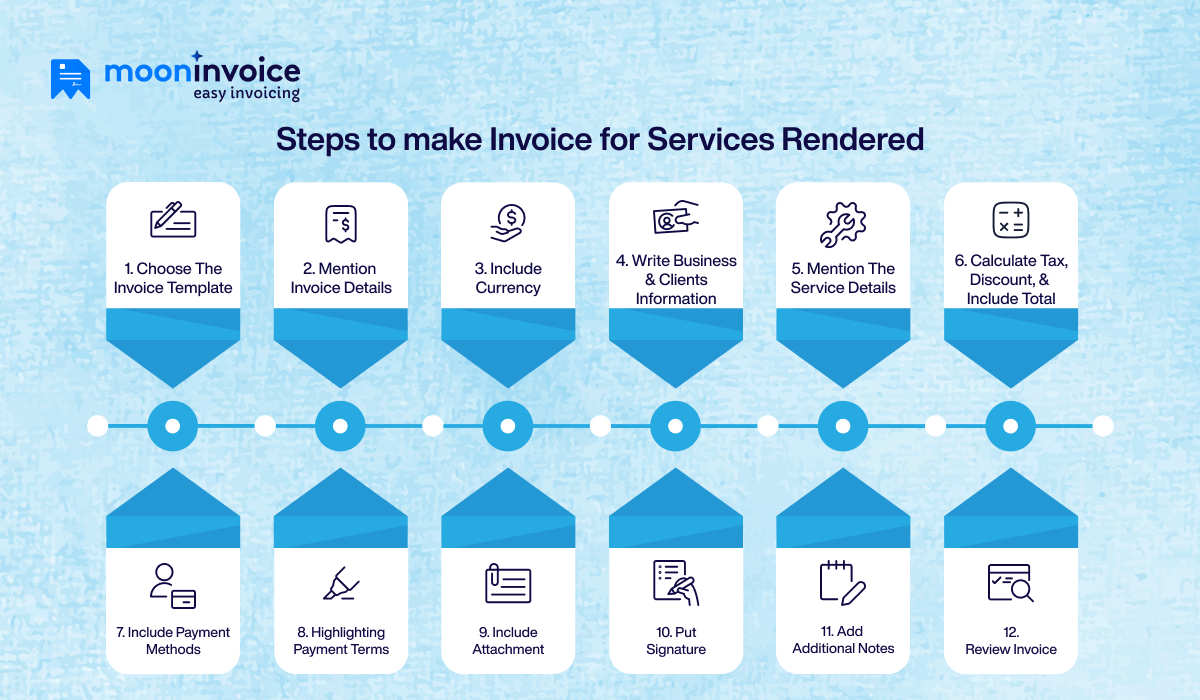
You can ease the process of writing an invoice for services rendered if you choose service invoice template. Having built-in service invoice samples helps to create invoices quickly with a professional look. Unlike the traditional pen-and-paper approach, which requires preparing an invoice from scratch, templates reduce manual effort. Thus, users can save time and quickly create an invoice.
Here are the steps you need to follow:
1. Choose the Template
The first step in writing an invoice for services is choosing the right template. Always choose a free service rendered invoice template that aligns with your business theme and brand. Also, go with the template that offers auto-calculation and is available in multiple formats, such as Word, Excel, Sheets, Docs, and PDF.
2. Mention Invoice Details
Mention invoice details, including invoice number, due date, and issue date. An invoice number is a unique identifier assigned to each invoice. It helps to track the invoice. You can choose any format to assign a number to your invoice.
Invoicing software like Moon Invoice enables you to create multiple invoices without changing the invoice number. The moment you assign the invoice number, you will receive the next consecutive number in the serial format on the next invoice creation.
3. Include Currency
Whether it is a local invoice for services or a cross-border service invoice, mentioning the currency is a good practice. When you make an international invoice for the services provided, include the client’s local currency. Other than that, you can issue the invoice in agreed upon currency.
4. Write Business & Clients Information
Include your business logo in an invoice. Also, mention the business name, address, and contact information. Similarly, you must include the client’s name, address, and phone number. Make sure to include your complete address and your client’s address when billing for services rendered.
This will enhance communication because, whenever either party tries to contact the other, they can easily obtain the contact details.
5. Mention the Service Details
The next step is to mention the details of the service provided to the client. Showcasing services with itemized prices is a better idea because it enhances the client’s understanding. Include a brief description, the amount spent on the particular service, and the rate of each service. Make sure the details are correct and to the point to avoid confusion.
6. Calculate Tax, Discount, & Include Total
Within the line item, you can include tax and any applicable discount. When you choose an invoice template, you gain access to automation. The template automatically calculates the tax, discount, and total amount, leaving no space for errors.
7. Include Payment Methods
What payment methods do you accept? You must mention it in your invoice. It is crucial because when your client knows which payment methods you accept, the payment process is easier.
8. Highlighting Payment Terms
Professionals need to specify payment terms that outline conditions the client must follow during the payment process. Outline what payment methods you accept, what the due date is, and what the late fees will be. You can spotlight the important terms to get the client’s attention.
9. Include Attachment
Attach the crucial & supportable documents that enhance your invoicing process. However, it is optional and applicable only when you have, and it is necessary to attach any supporting documents. Well, it is not necessary in every invoice you create. It depends on your business nature, policy, and agreement with the customer.
10. Put Signature
It looks like a genuine and trustworthy invoice when it includes a signature. You, as a business owner, can include your own signature. Other than that, any other authorized person’s signature is also valid.
11. Add Additional Notes
If there are any additional notes, you can include them on the service invoice. You can also mention a thank-you note at the end.
12. Review Invoice
Once the invoice is created, you must review it to ensure it is free of shortcomings. It is a necessary approach because identifying and fixing the issue early prevents confusion and payment delays.
Pro Tip:Always provide multiple payment options so users can easily make payments. Relying on a single payment method can also lead to late payments.
Invoice for Services Rendered Example
Here is an example of services rendered to better understand it. Suppose a graphic design company named Star Design Pvt Ltd offered logo design and website design services to the client. The charges for the services were $50 & $900. Once the service is completed, the company issues an invoice to the client in the format below:
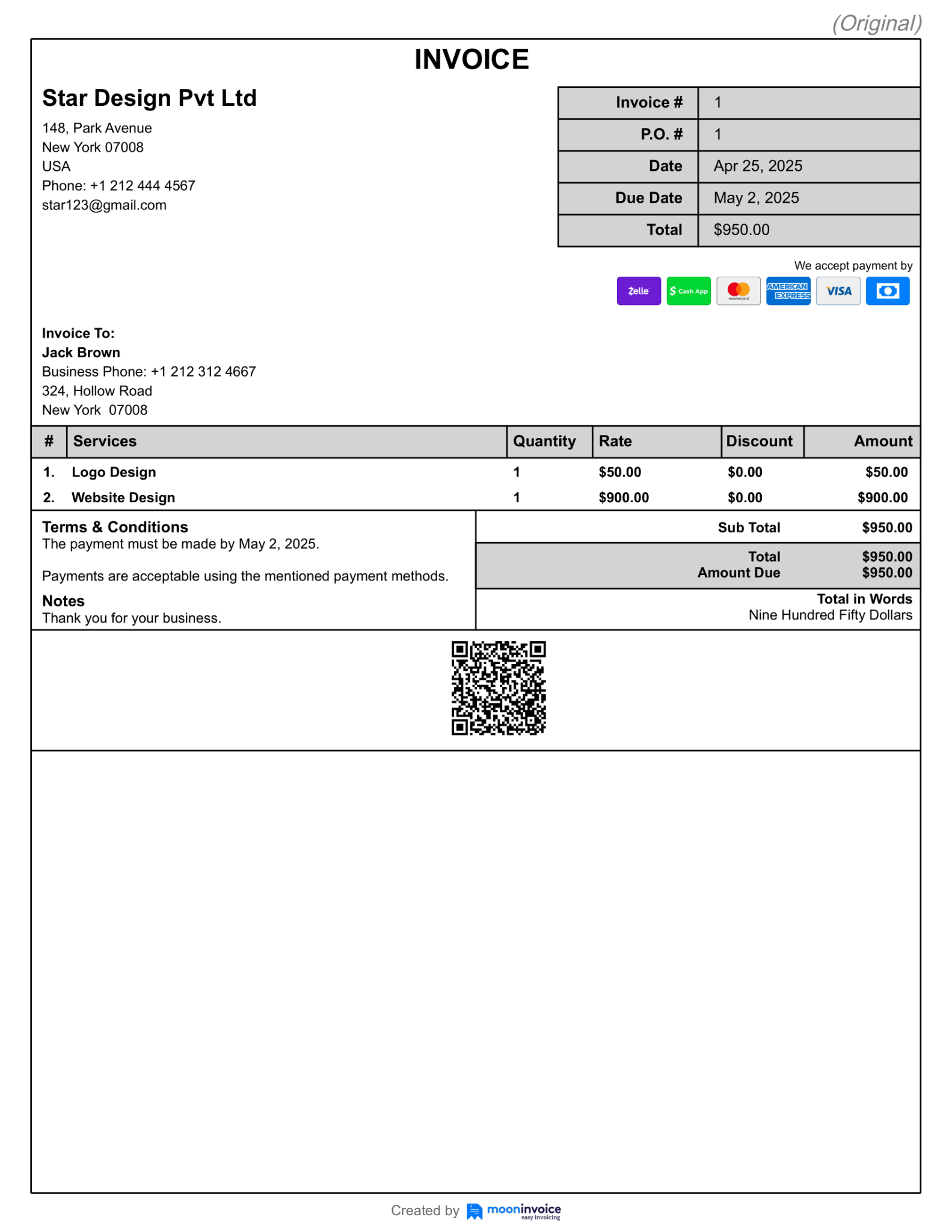
From the above services rendered example, you can get a clear idea. The invoice includes details such as invoice number, issue date, and the payment deadline. It clearly showcases the business and client contact details. Additionally, it includes the acceptable payment methods.
The offered services have been explained in the line-item form, along with their rates. Later on, payment terms were explained in a separate section.
Streamline Invoicing With Moon Invoice
Looking for the right platform to get a free services invoice template? Moon Invoice is here for you.
An award-winning invoicing software known for its simple user interface and advanced features. This AI-powered tool streamlines the one-to-one invoicing process for businesses of all sizes and industries.
- 66+ Free & customized templates available in MS Word, Excel, Sheets, Docs, and PDF.
- Every template possesses an auto-calculation feature that automatically computes the total amount, including tax and discount.
- Professionals can easily send the invoice online via WhatsApp or email.
- An AI-powered platform that offers a quick scan feature. This feature lets you scan a physical document to generate an estimate, invoice, or receipt, reducing manual effort.
- The software supports multiple payment options to improve payment flow. You can set any payment method as needed.
- You can set up recurring invoices for the ongoing services. This helps save time and improve on-time payment.
- The platform offers printer-friendly templates that make it easy to print the invoice on demand.
- Complete expense management in a digital form.
- Real-time tracking of an invoice status.
- Supports 100+ currencies and over 25 languages, making it an ideal platform for international client-serving professionals.
- For hourly projects, the platform allows you to track the time you spend on the project.
- The platform supports 15 business reports and enables professionals to generate customized reports.
Moon Invoice offers a centralized dashboard that enables you to manage everything (invoices, estimates, expense management, receipts) in one place. It is third-party-supported and integrates easily with other softwares. Additionally, it is cloud-synchronized, ensuring your data stays up to date across devices.
Delivered the Service? It’s Time to Invoice
Choose Moon Invoice, helping over 1.7 million worldwide users to create personalized invoices.
Last Remarks
Just creating an invoice for services rendered doesn’t matter. The value is that you share an accurate, clear, and professional-looking invoice with your client. This not only keeps your cash flow active but also helps to keep your client relationship healthy. Mind it, invoicing is not just payment requesting document; it also represents your company’s brand.
It is worth using invoicing software like Moon Invoice to make your invoicing look great. So why not avail yourself of its edge-cutting features to keep your invoicing at the top level? Start the free trial Today!
FAQs
How to bill for services rendered?
What information should be included in a service rendered invoice?
When should I use payment for services rendered?
Is a services rendered invoice different from a regular invoice?
Can I send an invoice for services rendered before payment is made?



We at Moon Invoice, are the best minds behind smarter invoicing and seamless business growth. We love to solve financial problems and keep providing effective tips through our blogs, newsletters, and social media channels. As a team, we continue exchanging ideas about growing financial challenges and smart use of automation tools.