

Inventorymanagementsoftware for better
stock control
stock control
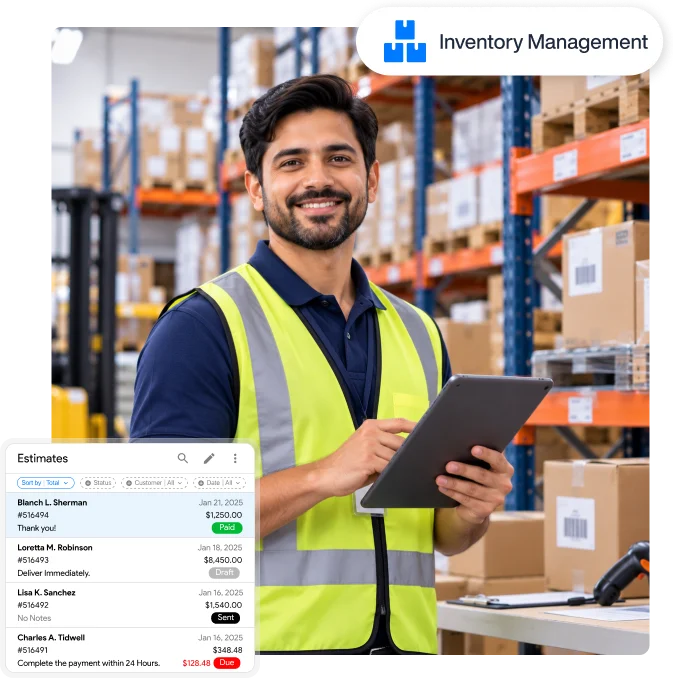
Small retail shops, merchants, and warehouse managers know how tracking inventory across multiple channels can be a daily headache. An adaptable inventory software for product tracking brings much-needed clarity to stock management. No scattered data, no manual checkups, and, importantly, no running out of stock.


Why do you need software for inventory management?
Warehouse managers desperately need inventory planning tools to replace the daily guesswork
of stock tracking with real-time accuracy.

Multi-channel sync
Selling across multiple channels often leads to delayed stock updates. Retail stock management software ensures inventory data syncs in real time.

Order management
Smart inventory management software centralizes every incoming sale into one fulfillment queue, helping your team dispatch orders without delays.

Error-free stock reports
Inventory software brings relief to warehouse managers who no longer have to rely on guesswork. With just a few clicks, they can generate accurate stock reports.
Features designed to make your workday easier
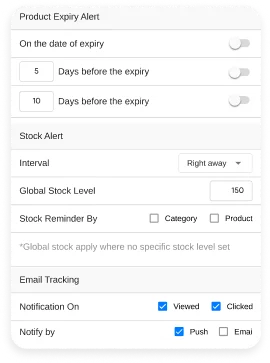
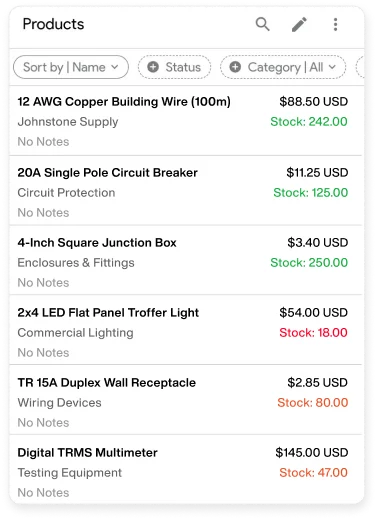
Real-time stock insights
Real-time stock insights
 Receive low-stock notifications as soon as your stock level dips below the
defined threshold, helping you reorder without delay.
Receive low-stock notifications as soon as your stock level dips below the
defined threshold, helping you reorder without delay.
Product aging reminders
Set the number of days in advance to get notified about products nearing
their expiry dates, helping you prevent unnecessary wastage.
Barcode generation and scanning
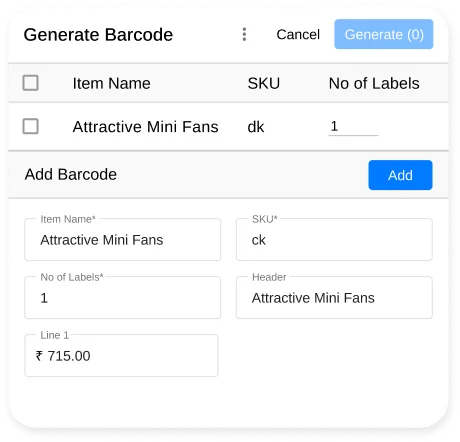
Generate barcode labels
Generate different barcodes such as CODE128, EAN13, and more with full
control over bar thickness, font sizes, and paper dimensions.
Instant barcode scanning
Use handheld scanners or device cameras to scan barcode details, instantly
populate checkout fields, and update live stock levels automatically.


Product variant & SKU management
Generate product images with AI
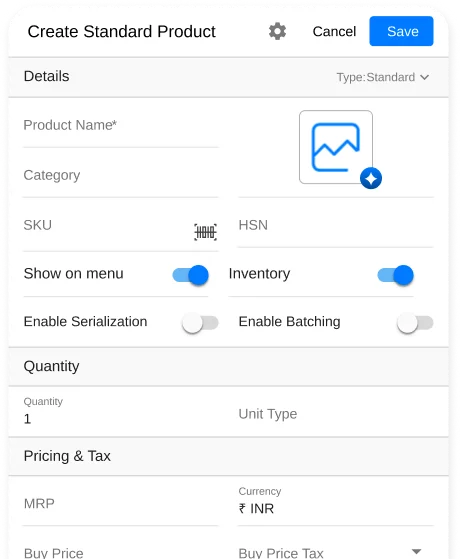
Create standard or assemble products using our built-in AI image generator
without expensive photography software.
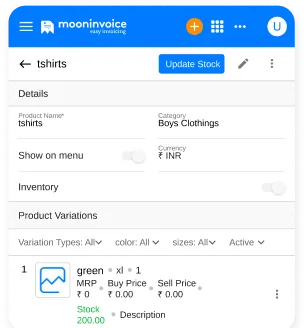
Manage multi-variant and combo products
Organize products with multiple attributes like size, color, or material
effortlessly. Plus, group individual items into attractive combo deals.
Customizable thermal prints
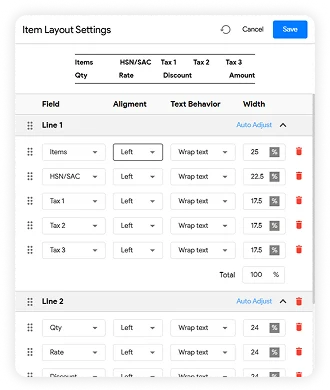
Flexible print layouts
Customize the way you want to print thermal receipts. Adjust margin
spacing, font sizes, and select exactly which details to show or hide.
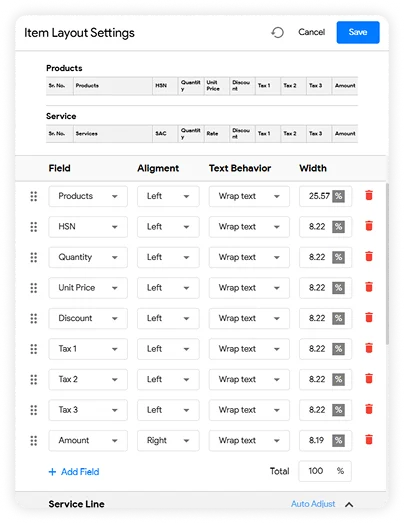
Adjust column layout in PDF
Easily add or remove columns for quantity, tax, and item display order in
normal PDF prints to match your printing requirements.
Reporting without guesswork
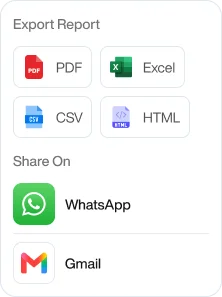
Export-friendly stock report
Get an accurate stock report highlighting current stock levels and product
valuations. Export it in CSV, PDF, HTML, or directly share via WhatsApp.
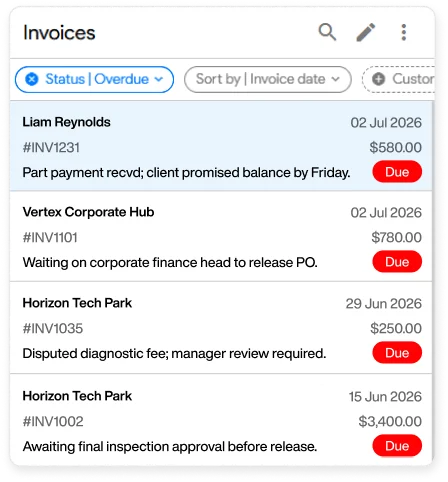
Order aging report
Track unfulfilled orders based on how long they have been past due, along
with total outstanding balances. It helps your team identify late payments.
More features to scale your business operations

Invoicing
Design personalized invoices and bills for your clients in a minute or less.

Estimating
Get professional estimates ready with our editable estimate templates.

Purchase order
Generate and send POs to suppliers when stock hits reorder thresholds

Credit note
Add credit notes for customer returns to instantly adjust account balances

Time tracking
Track staff clock-ins, shift hours, and cashier logs right at your fingertips.

Online payments
Settle payments via e-wallets, credit cards, and other cashless payment modes.

Accounting
Centralize P&L statements, balance sheets, and tax reports under one roof.

Reporting
Access real-time stock reports, purchase order reports, payment reports, and more.

Expense tracking
Monitor outgoing cash flow, including manufacturing costs and supplier payments.
Manage store inventory from any platform
Manage inventory from any device with Moon POS available on Android, iOS, Mac, Windows, and Web.





What store owners are saying about Moon POS
See how retail store owners and warehouse managers feel about managing stock with Moon POS.





We currently operate three boutique locations, and keeping stock levels synchronized used to be a daily headache. Heading to Moon POS, we completely eliminated manual stock audits. Now we have real-time inventory updates across all stores.

Our team had no idea about what’s remaining in the inventory because we relied on lots of manual things. Moon POS automated all of that. At the moment, we know exactly when to reorder and have full eyes on product movements.

Using the inventory and POS system, Moon POS, our checkout speed combined with instant stock deduction has transformed our sales. Tracking material costs, managing supplier invoices, and handling multi-currency payments is now as smooth as it gets.

Frequently running out of stock?
Let Moon POS keep your inventory synced, so you never lose sales to an empty shelf.

Product library
Stock alerts
Thermal prints

No credit card required
Free 7-day trial
Cancel anytime
24/7 support
Frequently Asked Questions
Does Moon POS support offline accessibility?
Yes, it has offline work support, so retail business owners can scan items, generate receipts, and even view stock reports. However, the updates only take place once the internet connection is restored.
What hardware is compatible with Moon POS?
1D/2D barcode scanners, cash drawers, and MSwipe EDC payment terminals are among the devices compatible with Moon POS. It connects via Bluetooth, USB, Wi-Fi, or LAN, delivering fast hardware synchronization across all your checkout stations.
How does Moon POS handle multi-variant products?
Moon POS allows you to create a multi-variant product, for which you can assign attributes such as size, color, material, or style. Each variant receives its own unique SKU, barcode, price, and stock count. When sold, Moon POS instantly deducts stock for that specific SKU across all your store locations.
Can I set reminders for aging products in my inventory?
Yes, you can set custom threshold days on Moon POS to receive alerts before products hit their expiry date. By doing so, your warehouse team can move aging stock before it turns into dead inventory.





- Experience full-fledge invoicing module with estimates, POs, receipts
- Get offline support to work seamlessly
- Multiple payment gateways + custom payment method
- Live customer support
- Manage projects and customers efficiently
- Automate workflow, get analytics, & more
For my business, one of the headaches was managing both stocks and expenses. Luckily, I switched to Moon Invoice and found the hassles of stock and expense management getting faded. Thanks to this amazing invoicing app.


Try Moon Invoice Today!
- We Make Invoicing a Childsplay!
- No Complex Features, No Longer Processes
- Save Time, Boost Productivity
- Experience full-fledge invoicing module with estimates, POs, receipts
- Get offline support to work seamlessly
- Multiple payment gateways + custom payment method
- Live customer support
- Manage projects and customers efficiently
- Automate workflow, get analytics, & more
For my business, one of the headaches was managing both stocks and expenses. Luckily, I switched to Moon Invoice and found the hassles of stock and expense management getting faded. Thanks to this amazing invoicing app.
Try Moon Invoice Today!
- We Make Invoicing a Childsplay!
- No Complex Features, No Longer Processes
- Save Time, Boost Productivity
- Experience full-fledge invoicing module with estimates, POs, receipts
- Get offline support to work seamlessly
- Multiple payment gateways + custom payment method
- Live customer support
- Manage projects and customers efficiently
- Automate workflow, get analytics, & more
For my business, one of the headaches was managing both stocks and expenses. Luckily, I switched to Moon Invoice and found the hassles of stock and expense management getting faded. Thanks to this amazing invoicing app.
We will send you an email with instructions to reset it.
- We Make Invoicing a Childsplay!
- No Complex Features, No Longer Processes
- Save Time, Boost Productivity
- Experience full-fledge invoicing module with estimates, POs, receipts
- Get offline support to work seamlessly
- Multiple payment gateways + custom payment method
- Live customer support
- Manage projects and customers efficiently
- Automate workflow, get analytics, & more
For my business, one of the headaches was managing both stocks and expenses. Luckily, I switched to Moon Invoice and found the hassles of stock and expense management getting faded. Thanks to this amazing invoicing app.
Enter Password to link your account with Gmail
- We Make Invoicing a Childsplay!
- No Complex Features, No Longer Processes
- Save Time, Boost Productivity
- Experience full-fledge invoicing module with estimates, POs, receipts
- Get offline support to work seamlessly
- Multiple payment gateways + custom payment method
- Live customer support
- Manage projects and customers efficiently
- Automate workflow, get analytics, & more
For my business, one of the headaches was managing both stocks and expenses. Luckily, I switched to Moon Invoice and found the hassles of stock and expense management getting faded. Thanks to this amazing invoicing app.
Try Moon Invoice Today!
- We Make Invoicing a Childsplay!
- No Complex Features, No Longer Processes
- Save Time, Boost Productivity



