

Pine Labs Integration: built for lightning-fast payments
When the weekend line wraps around the floor, your checkout speed is what makes or breaks your day. Pine Labs integration with invoicing software, Moon Invoice, empowers you to accept QR-based payments, slicing wait times in half and turning chaotic rushes into smooth checkouts.
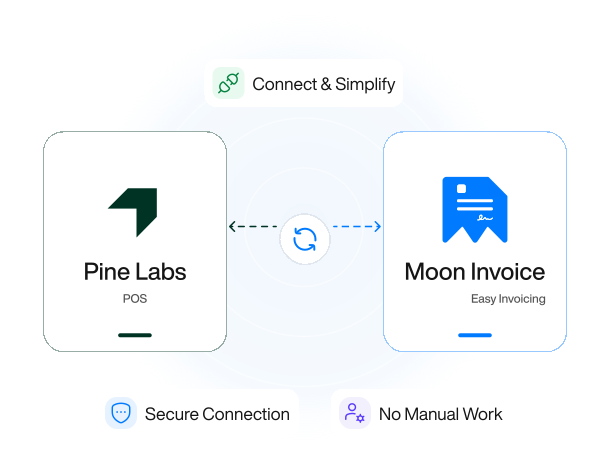
Why integrate Pine Labs with Moon Invoice?
Integrating Pine Labs with a reputable billing software brings a smoother payment experience for your customers.

Easier checkouts
Nobody wants to fumble through separate hardware just to close out a sale. Connecting Pine Labs with Moon Invoice, your checkout process is easier as well as faster.

Queue-buster
This integration also acts as a queue-buster because your guests can scan the QR code and make the payment, dispersing long queues at the checkout counter.

No cashier typos
With Pine Labs integration, there is no risk of cashier typos because the right amount pops up on the screen as soon as the bill is generated. No typos, no awkward delays.
Pine Labs POS integration: a unified hub for billing and payments
Pine Labs integration enables users to dissolve point-of-sale friction, transforming hectic rushes into quick sales.
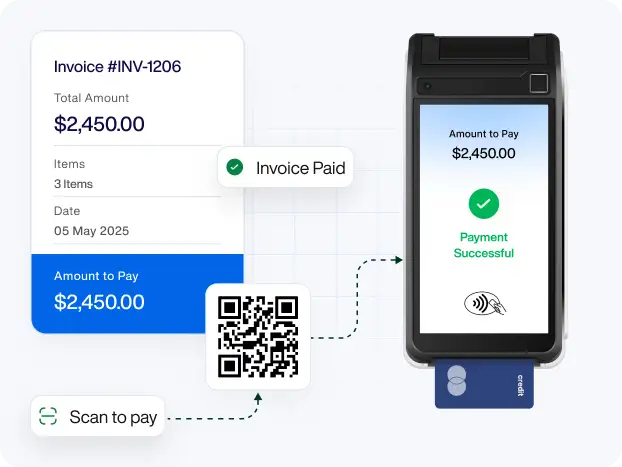
Cashless & immediate payments
By integrating Pine Labs with Moon Invoice, cashless transactions become instant, and your digital ledger is updated promptly. The moment a customer swipes or scans, the payment is authorized, and funds are deposited into the merchant’s account in a flash.
- The second a payment clears the Pine Labs terminal, the invoice status flips to "Paid"
- Pine Labs integrations assure no long queues by accepting cashless payments
- No hassle of exchanging physical cash or asking the guest to wait a little longer
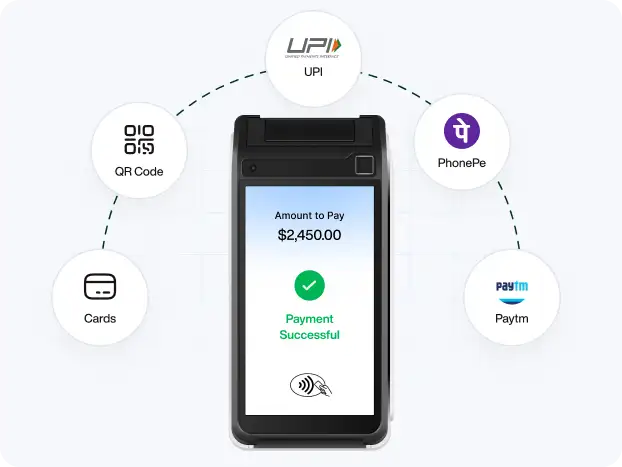
Payment flexibility
Pine Labs integration brings in the payment flexibility for your guests who usually have ever-changing preferred gateways. This integration meets their needs and allows them to complete the payment right away, enhancing their overall shopping experience.
- Supports multiple payment modes like debit cards, credit cards, and UPI apps
- Buy Now, Pay Later (BNPL) for guests to split large bills into monthly installments
- Accepts mobile payments via a dynamic QR code that displays on the terminal screen
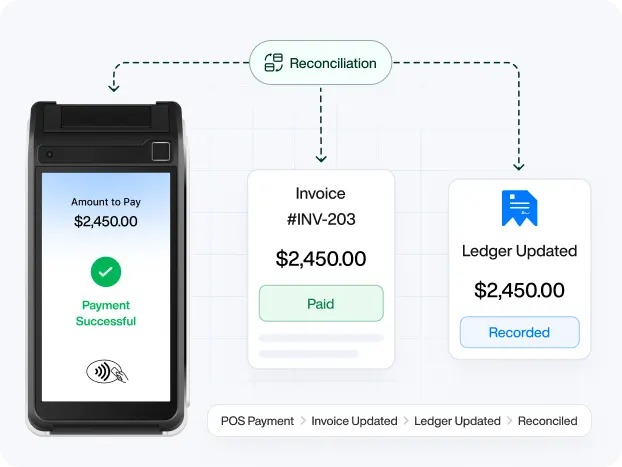
Effortless reconciliation
Pine Labs payment gateway integration takes care of your end-of-day accounting. It matches the exact digital invoice the moment the transaction clears, bridging the gap between your point-of-sale system and your digital ledger.
- Reconciles the payment with your accounting books, preventing potential discrepancies
- No manually checking every transaction with your bank account statement
- Ensures every dollar processed on the terminal maps directly to the corresponding entry
Glitch-free reporting
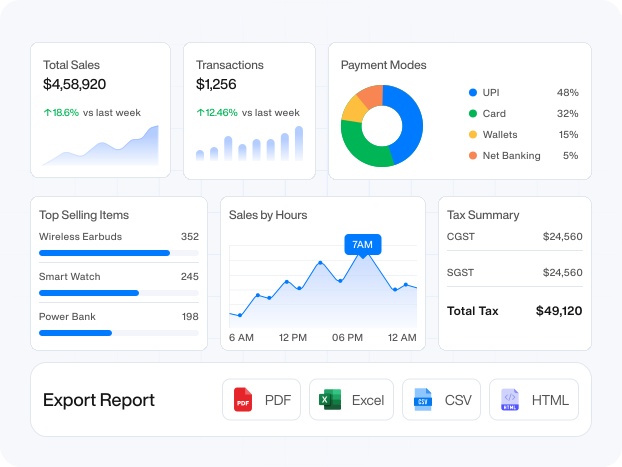
Integrating Pine Labs with the POS billing software, Moon Invoice, means you can get error-free reports. Such online reporting functionality helps you track the top-selling items, customer demands, and peak hours. You don't lift a finger.
- Aggregated report of payment records across every single Pine Labs machine
- Auto-generated financial reports like summary, sales, and payment made reports
- Comprehensive tax reports, so you don’t have to compile Pine Labs data manually

Trusted by 1.7M+ users with AI-powered billing solutions
Smart Invoicing.
Stronger
Business.
Create professional invoices, manage expenses, track payments and get paid faster - all in one simple platform.
- No credit card required
- Free 7-day trial
- Cancel anytime
Connect the apps that keep your business running
Integrate all the necessary apps you need to run your business with Moon Invoice and save your valuable time.


WooCommerce
Sync products, customers, and orders.


Venmo
Let customers pay quickly using their Venmo account.

Apple Pay
Enable one-tap payments across Apple devices.
Frequently Asked Questions
If you have any further questions, please don't hesitate to reach out to our customer support team for assistance.
How do I connect my Pine Labs terminal with Moon Invoice?
To connect Pine Labs, open the Moon Invoice app, head to the Integrations section, and discover Pine Labs. Hit the “Connect” button and start populating required details like Merchant ID, Store ID, Security Token, and Client ID. Following this, click Save to complete the integration.
What are the common challenges when integrating Pine Labs with accounting software?
The most common integration challenges stem from network connectivity timeouts, TID mapping mismatches, and batch settlement delays. All of which require proper server retry mechanisms and clear API webhook configurations to thwart accounting discrepancies.
How does payment reconciliation work between Pine Labs and Moon Invoice?
The moment a customer swipes a card on the Pine Labs terminal, the machine transmits a verified transaction reference code back to Moon Invoice, instantly linking the payment to the exact invoice and marking it as "Paid." Furthermore, Pine Labs sends payment records to the ledger, allowing Moon Invoice to automatically match and update them.
Does the Pine Labs terminal need to be on the same Wi-Fi network as the billing device?
Not necessarily. If you are using Local Network Mode (IP/Wi-Fi pairing), the Pine Labs terminal and the billing device must be connected to the same Wi-Fi network. However, if you are using Pine Labs Cloud API Integration, the terminal and your billing device do not need to share the same network at all.
How long does it take for terminal configuration changes to take effect?
The changes take effect instantly, i.e., as soon as you finish setting up the Pine Labs terminal. In case of a physical Pine Labs terminal, to recognize the update, you need to restart the terminal application, which will usually take 30 seconds or less.





- Experience full-fledge invoicing module with estimates, POs, receipts
- Get offline support to work seamlessly
- Multiple payment gateways + custom payment method
- Live customer support
- Manage projects and customers efficiently
- Automate workflow, get analytics, & more
For my business, one of the headaches was managing both stocks and expenses. Luckily, I switched to Moon Invoice and found the hassles of stock and expense management getting faded. Thanks to this amazing invoicing app.


Try Moon Invoice Today!
- We Make Invoicing a Childsplay!
- No Complex Features, No Longer Processes
- Save Time, Boost Productivity
- Experience full-fledge invoicing module with estimates, POs, receipts
- Get offline support to work seamlessly
- Multiple payment gateways + custom payment method
- Live customer support
- Manage projects and customers efficiently
- Automate workflow, get analytics, & more
For my business, one of the headaches was managing both stocks and expenses. Luckily, I switched to Moon Invoice and found the hassles of stock and expense management getting faded. Thanks to this amazing invoicing app.
Try Moon Invoice Today!
- We Make Invoicing a Childsplay!
- No Complex Features, No Longer Processes
- Save Time, Boost Productivity
- Experience full-fledge invoicing module with estimates, POs, receipts
- Get offline support to work seamlessly
- Multiple payment gateways + custom payment method
- Live customer support
- Manage projects and customers efficiently
- Automate workflow, get analytics, & more
For my business, one of the headaches was managing both stocks and expenses. Luckily, I switched to Moon Invoice and found the hassles of stock and expense management getting faded. Thanks to this amazing invoicing app.
We will send you an email with instructions to reset it.
- We Make Invoicing a Childsplay!
- No Complex Features, No Longer Processes
- Save Time, Boost Productivity
- Experience full-fledge invoicing module with estimates, POs, receipts
- Get offline support to work seamlessly
- Multiple payment gateways + custom payment method
- Live customer support
- Manage projects and customers efficiently
- Automate workflow, get analytics, & more
For my business, one of the headaches was managing both stocks and expenses. Luckily, I switched to Moon Invoice and found the hassles of stock and expense management getting faded. Thanks to this amazing invoicing app.
Enter Password to link your account with Gmail
- We Make Invoicing a Childsplay!
- No Complex Features, No Longer Processes
- Save Time, Boost Productivity
- Experience full-fledge invoicing module with estimates, POs, receipts
- Get offline support to work seamlessly
- Multiple payment gateways + custom payment method
- Live customer support
- Manage projects and customers efficiently
- Automate workflow, get analytics, & more
For my business, one of the headaches was managing both stocks and expenses. Luckily, I switched to Moon Invoice and found the hassles of stock and expense management getting faded. Thanks to this amazing invoicing app.
Try Moon Invoice Today!
- We Make Invoicing a Childsplay!
- No Complex Features, No Longer Processes
- Save Time, Boost Productivity



