




Running a small contracting business means wearing many hats: project manager, crew lead, and accountant. Of all those jobs, paperwork is the one most likely to cost you money. An estimate prepared with inaccurate figures could eat into your profit before you know. And error-prone invoices can shrink your profitable income even further.
So, what should you do to overcome these challenges?
To answer this, let’s dive into the detailed question-and-answer guide we prepared for small contractors. Why this guide? Because we’ve identified some of the common challenges contractors face when managing their construction business finances.
Let’s dive in without wasting any time…
1. How do I create a construction estimate?
You can create a construction estimate by heading to a reputable estimate generator such as Moon Invoice. Before that, review the project scope, site conditions, materials, labor requirements, and expected timeline.
Next, you need to calculate each expense, add equipment costs, subcontractor charges, and overhead costs. Then enter all this information into the estimate template, save it, and download it to share with prospects.
Example:
Suppose a contractor gets a bathroom renovation project. Now, to start the project, the contractor must estimate costs for every necessary part of the project.
It will start with estimating materials, labor, equipment rental, overhead, profit, and total estimated cost.
So, once these estimates are complete, here’s what the final estimate will look like:
| Cost component | Estimated cost |
|---|---|
| Materials | $3,000.00 |
| Labor | $2,500.00 |
| Equipment rental | $400.00 |
| Overhead | $300.00 |
| Profit | $800.00 |
| Total estimate | $7,000.00 |
The contractor can present the $7,000.00 estimate to the prospect and show how the expected project cost is calculated.
2. What should be included in a construction estimate?
A construction estimate includes multiple aspects, but customer information, materials, labor, and overhead costs are the most important.
As a contractor, you need to prepare a detailed estimate so it gets approved and you can start the project quickly. The following table explains the key details you must include in a construction estimate.
| Aspects | Description |
|---|---|
| Contractor name & address | Add your registered business name and complete business mailing address. |
| Contractor license | Include your contractor license number and relevant registration details, if applicable. |
| Contractor phone number | Provide an active business phone number for customer inquiries and communication. |
| Client name & address | Mention the customer’s full name and project or billing address |
| Project scope | Describe the work involved, including tasks, specifications, and deliverables. |
| Labor | List required labor hours, worker roles, hourly rates, and estimated charges. |
| Materials | Specify material descriptions, quantities, unit prices, and estimated total costs. |
| Overhead | Include business operating expenses allocated to the construction project. |
| Permit fee | Mention estimated building permit costs and other applicable approval fees. |
| Total (inclusive of taxes) | Show the estimated project cost, including all applicable taxes |
| Exclusions | Identify services, materials, or additional work not covered by the estimate. |
| Timeline | Mention the expected project start date, duration, and completion date. |
| Payment terms | Specify deposit requirements, milestone payments, accepted methods, and payment deadlines. |
| Valid for | State how long the quoted estimate remains valid before requiring revision. |
3. How do I calculate labor and material costs in a construction estimate?
When you are preparing a construction estimate, you need to calculate both materials and labor costs. To calculate the material cost, you should multiply the required quantity of each material by its unit price.
To calculate the labor cost, you should multiply the estimated work hours by the hourly rate for each worker or trade. In the end, you need to add delivery, equipment, and material waste costs to create a more realistic project estimate.
Example:
Let’s assume a contractor is installing laminate flooring in a 400 sq ft living room.
- Labor: Base pay of $30/hour + 25% burden = $37.50/hour
- Two installers working 10 hours
So, 20 hours x $37.50 = $750.
Now, material cost:
| Item | Cost |
|---|---|
| Laminate (400 sq ft + 8% waste = 432 sq ft × $3.50) | $1,512.00 |
| Underlayment (432 sq ft × $0.50) | $216.00 |
| Trim and adhesive | $90.00 |
| Delivery | $60.00 |
| Sales tax (7% on $1,878) | $131.46 |
| Materials total | $2,009.46 |
So, the total estimated cost before applying overhead and profit will be: labor + materials. It means $750 + $2,009.46 = $2,759.46.
4. How do I create a construction quote for a customer?
To create a construction quote, review the project requirements and prepare a detailed price breakdown based on the estimated costs. After that, include the scope of work, agreed pricing, materials, labor, applicable taxes, payment terms, and project timeline.
Also, don’t forget to mention the quote’s validity period and obtain customer approval before starting work.
Example:
Quote #Q-1042 for a backyard fence.
| Item | Cost |
|---|---|
| Cedar fence, 150 linear ft × $38 | $5,700.00 |
| One 4 ft walk gate | $450.00 |
| Removal of old fence | $600.00 |
| Fixed price | $6,750 |
- Payment schedule: 25% deposit ($1,687.50), with the balance due upon completion
- Start date: June 10
- Valid for: 14 days
- Exclusions: Staining, sealing, and utility locating
If lumber/ framing contractor prices rise after the customer signs, the price stays at $6,750.
5. What is the difference between a construction estimate, quote, and invoice?
The most common difference between a construction estimate, quote, and invoice is timing and commitment. A construction estimate provides an approximate projection of costs, whereas a quote presents a proposed price for the agreed scope of work and becomes legally binding once accepted.
On the other hand, an invoice is a payment request issued for completed work, project milestones, or agreed advance payments.
Example:
Let’s say a contractor is handling a garage renovation:
- Estimate: The contractor initially estimates the project cost at $15,000
- Quote: After finalizing the project scope, the contractor offers a fixed price of $15,000, which the prospect can accept or reject
- Invoice: Once the quote is accepted and the work is completed, the contractor sends an invoice for the outstanding $15,000, minus any advance payments already received
6. How do I turn a construction estimate into an invoice?
You can convert your construction estimate into an invoice in two ways. The first is paper-based, which is manual and can be hectic at times. Plus, converting each estimate into an invoice one by one also increases the chances of error.
The second approach is using reliable invoicing software. With powerful features and AI-backed automation, the chances of errors are negligible when you convert estimates to invoices. A standout feature of using software is that you can seamlessly convert paper-based estimates into digital invoices in seconds.
Example:
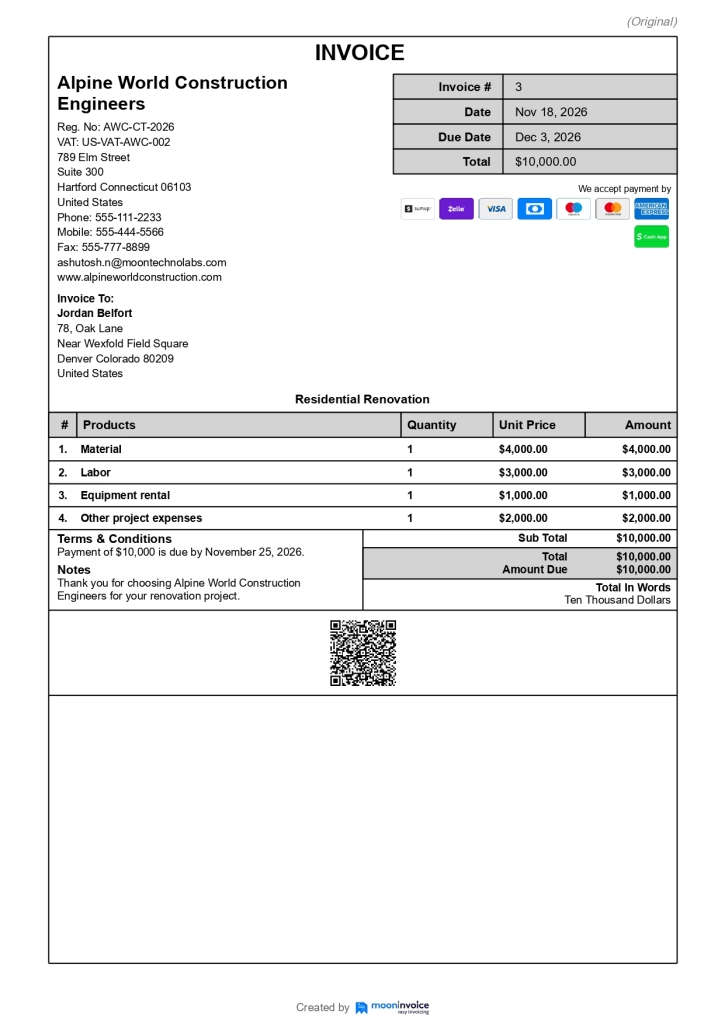
Suppose a contractor receives approval for a $10,000 renovation project. After completing the project, the contractor can convert the same estimate into an invoice using reputable construction invoicing software such as Moon Invoice. No need to create an invoice separately for one project.
If the customer has paid a deposit, mention it on the invoice and deduct it from the total amount due. In this case, the customer has not paid a deposit, so the invoice total of $10,000 must be paid within the specified timeframe.
Here’s how the invoice looks after converting from the original estimate.
7. How do I create an invoice for my construction work?
You can create a construction invoice for your completed construction work digitally using advanced invoicing software. Based on your accounting needs, choose software that simplifies your day-to-day billing and keeps records organized.
If you choose Moon Invoice for your construction billing, you can go to the invoice section, click the plus icon, and start filling in the details. Start with business and customer details, then add a unique invoice number and issue date.
You can also describe the completed construction work, list labor and material charges, calculate applicable taxes, and mention the total amount due.
Lastly, you can include payment methods, terms, and a clear due date before sending it.
Example:
Invoice #1103 for a bathroom tile installation.
| Item | Quantity | Rate | Amount |
|---|---|---|---|
| Tile installation labor | 14 Hours | $60 | $840.00 |
| Ceramic tile and grout | 1 Lot | $620 | $620.00 |
| Subtotal | $1,460.00 | ||
| Sales tax (7% on materials) | $43.40 | ||
| Total | $1,503.40 | ||
| Less deposit paid | – $500 | ||
| Balance due | $1,003.40 | ||
| Terms | Net 15 days | ||
| Accepted payment | ACH, Credit Card, Digital Wallets |
8. How do I invoice a client for materials and labor separately?
To create a separate materials and labor invoice, calculate both labor and materials, then combine them into one project charge. After that, include material descriptions, quantities, unit prices, labor hours, and hourly rates. Later, you can calculate each subtotal separately, add applicable taxes and other charges, and determine the final invoice amount.
Although in many construction projects materials and labor are calculated in one invoice, some contractors prefer them to be calculated separately.
Example:
If a contractor is preparing two separate invoices (labor and material) for a deck repair work, here’s what it would look like:
Labor invoice:
| Task | Hours | Rate | Amount |
|---|---|---|---|
| Remove damaged boards | 6 | $55 | $330.00 |
| Frame repair and board installation | 12 | $65 | $780.00 |
| Labor subtotal | $1,110.00 |
Material invoice:
| Items | Quantity | Unit price | Amount |
|---|---|---|---|
| Pressure-treated boards | 24 | $18 | $432.00 |
| Screws and hardware | 1 Lot | $85 | $85.00 |
| Material subtotal | $517.00 |
Final invoice:
| Summary | Amount |
|---|---|
| Labor | $1,110.00 |
| Materials | $517.00 |
| Sales tax (7% on materials only) | $36.19 |
| Total amount due | $1,663.19 |
This breakdown helps customers understand how much they are paying for materials versus repair work.
9. How do I add taxes to a construction invoice?
Tax rules vary by state, so confirm your state tax rules first. Some states tax only materials, others tax labor too, and some require contractors to pay tax on materials at purchase instead of charging clients.
On the invoice, show the tax rate and amount as a separate line, applied only to taxable items.
Example:
Let’s assume a contractor charges $5,000 for a project, including $3,000 in taxable materials and $2,000 in non-taxable labor. Since you are doing business in the United States, the applicable sales tax rate on materials is 6%. So, the calculation would be:
| Aspects | Amount |
|---|---|
| Materials | $3,000 |
| Labor | $2,000 |
| Sales tax (6% on materials) | $180 |
| Invoice total | $5,180 |
The contractor should verify the applicable tax treatment before issuing the invoice, as construction taxation varies by state and transaction type.
10. How do I create progress invoices for construction projects?
You can create progress invoices for construction projects by dividing the project into agreed milestones such as foundation work, framing, and final installation.
At each stage, invoice the completed portion of the contract value, subtract earlier payments, and show the contract total, billed to date, and remaining balance. This keeps cash flowing on long jobs and gives clients clear visibility.
Example:
A contractor takes on a $40,000 home renovation project with three payment milestones:
| Project milestone | Invoice amount |
|---|---|
| Foundation completion (30%) | $12,000 |
| Framing completion (40%) | $16,000 |
| Final completion (30%) | $12,000 |
| Total project cost | $40,000 |
In this case, the contractor must send three separate progress invoices to the client after completing each milestone.
11. How do I handle deposits and advance payments on construction invoices?
You can handle construction invoices by clearly stating the required deposit or advance payment in the first invoice or payment request. Clearly specify the agreed percentage or fixed amount, payment deadlines, and project terms.
Once received, record the payment and deduct it from subsequent progress or final invoices to avoid double billing.
Example:
A $12,000 kitchen remodel with a 20% deposit.
Deposit invoice #1201 (due before work starts):
- 20% × $12,000 = $2,400
Final invoice #1215:
| Items | Amount |
|---|---|
| Original contract price | $12,000 |
| Approved change order (Extra cabinet) | $600 |
| Adjusted total | $12,600 |
| Less deposit paid (Invoice #1201) | – $2,400 |
| Balance due | $10,200 |
12. How do I create a change order and invoice for additional work?
The best way to create a change order and invoice for additional work is to write it up before starting the extra work. Describe what’s being added or removed, the cost, and any schedule impact, then get the client’s signature.
Once it is approved, add the change order to your next invoice as a separate line item so the contract total reflects the new amount.
Real-life scenario: Testing a new drug
- Original deal: A pharma company hires your lab assistants to conduct standard blood safety tests on 100 patients for a new headache pill. The agreed price is $50,000.
- The surprise: Two months into the study, the pharma company notices that some patients are experiencing dizziness. They email your lab and ask, “Can you also test every blood sample for liver enzyme levels so we can prove the pill is safe?”
Part 1: The change order (the “before” paper)
Before your lab assistants run a single liver test, the supervisor sends this formal document to the pharma company:
Change order #001 (Study protocol amendment)
- Study name: Phase II Headache Trial (Protocol #HD-202)
- Original contract price: $50,000
What is changing?
Add Liver Enzyme Panel testing (ALT/AST) to all 100 patient blood samples, plus update the final FDA data report.
Cost of this change:
- Extra lab reagents & test kits (100 units): $4,000
- Lab scientist & data analysis time (40 hours): $6,000
- Total for change order #001: +$10,000
Time impact: Adds 2 weeks to final data delivery.
New total contract price: $60,000($ 50,000 (original + $10,000 change)
Part 2: The invoice (the “after” bill)
Your lab assistants finish testing all 100 samples for both the original blood safety panel and the new liver enzyme panel. Now you send the bill to the pharma company’s accounting team:
Invoice #8842
Bill to: Apex Pharmaceuticals Inc.
PO number: PO-99412
Description
Amount
Standard Blood Safety Testing – 100 Patients (Original Contract)
$50,000.00
Change order #001: Additional Liver Enzyme Panel & FDA Data Update
$10,000.00
Total due
$60,000.00
Attached: Signed copy of change order #001 & certificate of analysis.
13. How do I send a construction invoice to customers online?
You can send construction invoices to customers online in two ways. The first one is using email. In this method, you need the customer’s email address, where you will attach the invoice and the payment link.
The second method is sharing via WhatsApp. Go to any free online invoice generator tool, create your invoice by selecting a template, and fill in all necessary details. Once your invoice is ready, click the WhatsApp icon and send your construction invoice to your customer.
Example:
For the first option, using email, here’s what your email draft should look like. You can also use reputable invoicing software such as Moon Invoice, which comes with email templates, you only need to fill in the key details.
Below is an example email requesting payment for the amount due: $3,850 for a roof repair project.
Subject: Invoice Amount Due – $3,850
Hi David,
Thank you for choosing us for your roof repair project. Please find Invoice #1342 for $3,850 attached to this email.
You can pay securely by credit card or ACH using the payment link below. Please complete the payment by June 30.
[Pay $3,850 Online]
Thank you for your business!
Best regards,
Alpine World Construction Engineers
14. How do I track unpaid construction invoices?
If your construction firm follows a traditional paper-based approach, you can track unpaid construction invoices by maintaining a record of every issued invoice. Make sure you do not miss any key details such as invoice number, customer name, issue date, due date, etc. This is a manual approach, and here you need to manually categorize invoices based on paid, unpaid, and partially paid status.
However, if you have adapted to modern solutions and use invoicing software, tracking invoices can be easier. Advanced invoicing software allows you to quickly filter paid, unpaid, and overdue invoices in a matter of seconds. You save time and, most importantly, avoid the hectic process of tracking invoices one by one.
Example:
Let’s assume your firm is using invoicing software such as Moon Invoice. To track invoice status, go to the “Invoices” section and click “Status” to see which invoices are paid, unpaid, partially paid, recurring, or overdue.
15. How do I send payment reminders for overdue construction invoices?
You can send payment reminders to clients for overdue construction invoices using software or email. Generally, the software option is better because it provides more clarity, and you can see each figure right under your nose. This helps avoid unwanted errors when sending reminders to clients.
Email is another way you can send payment reminders to clients. Use a professional overdue invoice template to maintain a polite, consistent follow-up process.
Example:
Invoice #1410 for $3,200 is due July 15. You set up this reminder schedule once using Moon Invoice:
| Date | Reminder | Message |
|---|---|---|
| July 12 | 3 days before due | “Friendly heads-up: Invoice #1410 for $3,200 is due July 15.” |
| July 15 | Due date | “Invoice #1410 is due today. Pay securely using the link below.” |
| July 22 | 7 days overdue | “Invoice #1410 is now overdue. Please arrange payment at your earliest convenience.” |
| July 30 | 15 days overdue | “Final notice: a 1.5% late fee ($48) has been applied, bringing the total to $3,248.” |
With automatic reminders in Moon Invoice, this sequence goes out without you writing a single follow-up email.
16. How can I automate construction estimates and invoices?
Automating your construction estimates and invoices is a simple process. All you need is invoicing software that handles repetitive tasks like preparing estimates, converting approved estimates into invoices, calculating totals, and tracking expenses.
When considering automation, also look for project management and time-tracking features in the invoicing software. Project management helps you track key milestones in ongoing construction projects, while time tracking lets you track billable hours and create invoices more accurately.
Example:
Let’s assume an HVAC contractor has 12 maintenance clients, each paying $250 per month.
| Task | Manual | Automated |
|---|---|---|
| Creating 12 invoices monthly | 12 x 15 minutes = 3 hours | Set up once with recurring invoices. No need to create every time. |
| Monthly billing total | 12 x $250 = $3,000 (Need to do manually) | 12 × $250 = $3,000 (Calculated automatically) |
| Tracking invoice | Need to check emails, physical documents, and files | Get notified when the client opens their email inbox. |
As you can see, with the manual method, the contractor spends more time creating invoices, calculating the billing total, and tracking invoices. However, with automation, these processes are faster and error-free.
17. What is the best invoicing software for construction contractors?
The best invoicing software for construction contractors highly depends on the project complexity, business size, and billing needs. A contractor with small-to-medium projects may not need a full-fledged ERP solution, but a simplified invoicing application such as Moon Invoice can be ideal.
On the other hand, large-scale construction firms can choose construction-specific invoicing software such as Knowify, ServiceTitan, or Contractor Foreman.
Primary features of Moon Invoice
- Ready-made construction templates: You will get construction-specific templates for both estimates and invoices, which will simplify your overall billing process.
- AI-powered invoicing: Convert your paper-based invoices into digital invoices using an AI-powered scanning feature that extracts key information from paper invoices.
- Estimate-to-invoice conversion: Quickly convert estimates into invoices with one click. No need to create invoices separately. You can also turn paper estimates into digital invoices.
- Online payments: Get paid faster by offering cashless payment options like digital wallets, ACH, Apple Pay, PayPal, Stripe, Venmo, etc.
- Quick sharing: Built-in support for email and WhatsApp sharing lets you quickly send each estimate or invoice to clients without switching tabs or opening separate applications.
FAQs on Construction Estimates and Invoices
Can AI create a construction estimate?
Can AI create a construction invoice from an estimate?
Can I create a construction invoice from my phone?
How can a contractor create an estimate faster?
What is the easiest way for a small contractor to manage estimates and invoices?



We at Moon Invoice, are the best minds behind smarter invoicing and seamless business growth. We love to solve financial problems and keep providing effective tips through our blogs, newsletters, and social media channels. As a team, we continue exchanging ideas about growing financial challenges and smart use of automation tools.