


Managing one retail store is already a challenging task, but running multiple retail stores? That adds a different level of complexity. When you are managing multiple retail stores, you need to maximize your human efforts to keep every process in sync.
Inventory needs to stay up to date across stores, employees need to be managed, sales need to be tracked, and customers should get a consistent experience no matter which store they visit. If you are unaware of how to manage multiple stores, your entire operations could collapse.
But there’s nothing to be worried about. In this guide, we will explore what multi-store management is, how to manage multiple stores, the challenges you must be aware of, and the benefits of using multi-store management software.
Let’s dive in…
📌 Key takeaways
- Multi-store management is the process of managing operations across multi-located stores using software.
- Retailers must centralize store data and automate repetitive tasks to manage multiple stores.
- Keeping inventory in sync and tracking store performance are among the major challenges.
- Key features to look for in multi-store software are automated stock alerts and barcode generation.
- Benefits of using software for multi-store management include faster expansion and scalable operations.
What is multi-store management?
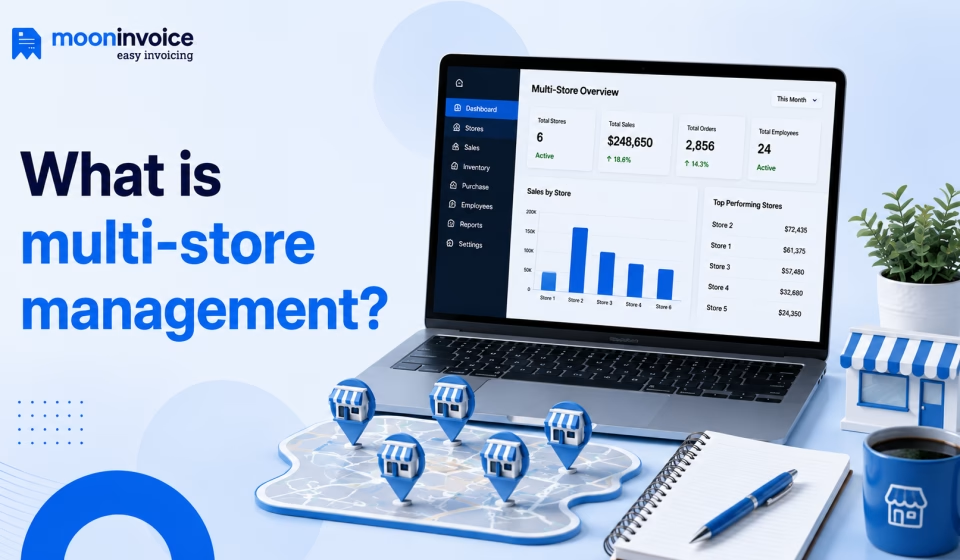
It is the process of managing and coordinating the operations of multiple retail stores using a centralized system or management structure. Retailers or store owners can oversee key business activities from a single centralized system. When sales, inventory, employees, purchasing, and reporting are managed across different locations, retailers can keep each store’s operations organized.
With multi-store management, retailers gain a unified view of their stores across locations rather than managing each store as a separate business. This unified workflow makes it easier for retailers to monitor performance, move inventory between stores, and manage operations more efficiently.
Losing track of your inventory continuously?
Track inventory in real time, automate stock updates, and manage your multi-located stores with greater control using Moon POS.
How to manage multiple retail stores?
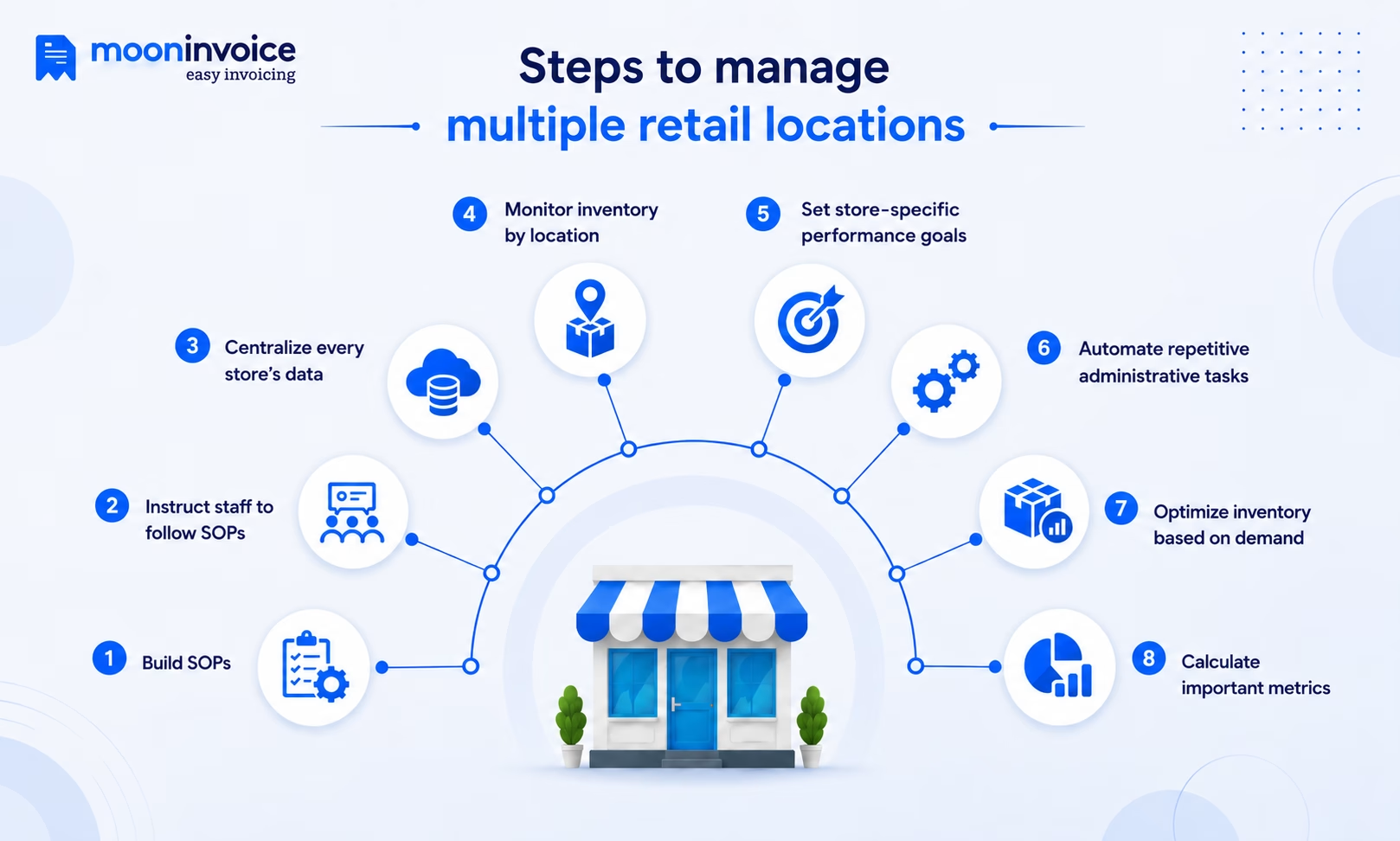
The intricacies of managing multiple retail stores can be addressed by following the right steps. The following is a step-by-step process to manage multiple retail stores with ease.
Step 1: Build SOPs
The first step is to build standard operating procedures (SOPs) for essential activities such as billing, inventory receiving, returns, and store closing. Clearly documented SOPs give every location a consistent way to handle day-to-day operations and create a strong foundation for managing stores when you plan to expand your retail business.
Step 2: Instruct staff to follow SOPs
Once the SOPs are in place, make sure your staff understands and consistently follows them. Train employees on the processes they are responsible for and ensure store managers monitor compliance. This helps maintain the same operational standards across locations while reducing inconsistencies in daily store activities.
Step 3: Centralize every store’s data
The next step is to ensure you have a centralized system to keep all store information in one place. If you maintain separate records for each store, it will create more confusion. Also, you need to make sure sales, inventory, products, customers, and employee data are easy to access and update. With centralized store data, you will get a complete view of your stores without switching between multiple systems.
Step 4: Monitor inventory by location
The fourth step is to track inventory separately for each store. Why separately? Because it helps you understand what is selling quickly, what is sitting on shelves, and what needs to be replenished. Monitoring inventory by location will also help you identify excess stock that could be transferred to another store if the demand is high.
Step 5: Set store-specific performance goals
In this step, you need to set performance goals for every store. There can’t be a single goal set for all stores, as each location may have different foot traffic, product demand, and market conditions. So, the same target for every store may not work. For every store, set goals based on sales, inventory turnover, average order value, or other KPIs as part of your multi-store retail management strategy.
Step 6: Automate repetitive administrative tasks
The next step is crucial, as it focuses on automation. You should look forward to reducing the time that is spent on routine work such as updating inventory, reading sales, generating reports, and managing purchase information. Instead of manual, paper-based processes, consider a reliable retail management system or POS solution such as Moon POS. Using a POS solution helps you keep track of your inventory activities and reduces repetitive manual updates across locations.
Step 7: Optimize inventory based on demand
Use sales and inventory data to understand which products perform best at each location and adjust stock accordingly. Moving products between stores, replenishing fast-moving items, and reducing excess stock based on actual demand can help you maintain healthier inventory levels across different stores.
Step 8: Calculate important metrics
The last step is to calculate key metrics regularly to understand how each store is performing. Track sales, profitability, inventory turnover, average order value, and other relevant KPIs for each of your multi-located stores. Comparing these metrics can help you identify underperforming stores, recognize growth opportunities, and make better decisions about inventory, promotions, staffing, and expansion.
What metrics should you track across multiple stores?
Managing stores across multiple locations is not just about total sales; it is about clearly understanding store-level metrics. The table below highlights key metrics necessary for managing multiple locations.
| Metrics | What it tells you |
|---|---|
| Sales revenue | Shows how much each store generates and helps compare performance across locations. |
| Gross profit | Helps determine whether a store is generating healthy returns after accounting for product costs. |
| Average transaction value | Shows how much customers typically spend in a single transaction. |
| Inventory turnover | Reveals how quickly products are selling and whether inventory is moving efficiently. |
| Stockout rate | Shows how frequently products become unavailable and can highlight gaps in inventory management. |
| Sell-through rate | Helps you understand how effectively your available inventory is being sold. |
| Return rate | Indicates how often customers return products and may reveal issues with specific products or stores. |
| Sales per employees | Helps measure employee productivity and compare staffing efficiency between stores. |
| Customer retention rate | Shows how effectively each location is turning customers into repeat buyers. |
Challenges of managing multiple retail stores
As your retail business grows, keeping everything consistent and under control can be difficult. Here are some challenges retailers face in multi-store management:
Challenge 1: Keeping inventory in sync
Tracking stock across multiple retail locations can become difficult when each store has different sales patterns and inventory levels. Without complete visibility, one location may have excess stock while another runs out of the same product.
Challenge 2: Managing consistent operations
Maintaining consistency is another major challenge for retailers operating multiple online stores alongside their physical locations. Without a well-defined process, different stores may follow different ways of billing, returns, discounts, purchases, and customer service, which can derail their overall store operations.
Challenge 3: Relying on spreadsheet-based reports
Using spreadsheets to collect and compare data across different stores can make reporting time-consuming. Employees may need to gather information from each location and manually update separate sheets. This increases the chances of errors and makes it harder to get an up-to-date view of sales, inventory, and store performance.
Key features of an effective multi-store management system
Operating multiple stores is much easier when retailers plan to bring essential retail operations into one place. Using a multi-store management system is key to keeping every retail store’s operations organized. Here are the primary features of an effective multi-store management system you should consider:
1. Automated stock alerts
Knowing when inventory is running low is essential to manage stock across multiple locations. Automated stock alerts notify you when a product reaches its predefined minimum level, so you can replenish it before it runs out. This helps prevent stockouts, maintain the right inventory levels, and ensure you don’t have to manually check stock at every store.
2. Multi-store management
Retailers with physical outlets at multiple locations must look for a feature that helps them manage their stores across multiple locations. It keeps stores located in different places organized from one central point. With this feature, retailers can manage products, sales, inventory, and store-specific operations across all locations.
3. Barcode generation
Barcode generation is another important feature for retailers, particularly those handling a large number of products across stores. Using this feature, you can generate and print product barcodes, including thermal-printed barcodes. It helps staff to easily label products and identify them during billing and inventory activities. It simplifies product handling and improves inventory accuracy.
4. Reporting and analysis
One more key feature to consider for retail store owners is reporting and analysis. With detailed reports such as a summary report, a sales report, a profit-by-product report, and a sales-by-customer report, store managers can quickly gain insights into how each store is performing. A multi-store POS system with centralized reporting can make this information easier to access and help you identify trends and operational gaps.
Manual store management vs multi-store management software
Operating multiple stores often means handling more inventory, sales records, employees, and reports than a single store. But the real challenge begins when you manage everything manually instead of using software. The table below explains the primary differences between manual store management and multi store retail management software.
| Basis of difference | Manual management | Multi-store software |
|---|---|---|
| Inventory visibility | Stock information is usually maintained in separate spreadsheets, registers, or store-level systems. Difficult to get a complete view. | Provides centralized visibility into stock levels across stores. It makes multi-store inventory easier to monitor and manage. |
| Sales tracking | Store managers may record and share sales data separately. Requires manual consolidation before you can compare locations. | Sales from different stores can be tracked in a single system. Helps store managers view store-wise sales performance. |
| Stock transfers | Employees may need to coordinate transfers manually and update records at both locations. | Makes it easier to record, track, and manage stock transfers between locations based on availability and demand. |
| Reporting | Reports often need to be prepared by collecting data from individual stores, which can take considerable time. | Generates detailed reports that help compare sales, inventory movement, revenue, and other key metrics across locations. |
| Pricing updates | Price changes may need to be entered separately at every store. It increases the risk of inconsistent pricing. | Allows prices and product information to be updated centrally and applied to selected or all locations. |
| Data accuracy | Repeated manual entries increase the possibility of duplicate records, missing information, and human errors. | Automated data synchronization eliminates repetitive entry and helps keep records more consistent across locations. |
| Scalability | Adding more stores often means creating more spreadsheets, processes, and administrative work. Scaling up is difficult. | A centralized system can support additional locations without requiring the entire management process to be rebuilt. |
Benefits of using software to manage retail stores
Using software to manage multiple retail stores has many benefits beyond just reducing manual work. The following points give us a clear idea of the key benefits of using software to manage retail stores:
- Faster expansion: Launching stores in new locations becomes easier when you have a well-defined process and software that gives you complete control over store data without having to start from scratch.
- Self-ordering kiosk: By integrating the POS inventory software with a self-ordering kiosk, your customers can browse products, place orders, and make payments independently. It keeps sales records synchronized while ensuring no long queues.
- Smart data management: Important operational data such as sales, inventory, customers, and purchases are all managed in one place, i.e., in the software. This makes the store data more reliable and organized.
- Scalable operations: As your retail business grows, software helps you manage increasing sales, inventory, employees, and locations without adding the same amount of administrative workload.
- Reduced stock-related losses: Better visibility into inventory helps you avoid overstocking, stockouts, and products sitting unsold for too long. This way, stores maintain healthier stock levels and reduce unnecessary inventory costs.
Make product tracking easier across every store
Generate barcodes in seconds and speed up product scanning.
Barcode scanning
Inventory tracking
Real-time updates
Simplify multi-store management with the right software
As a retailer, when you are operating multiple retail stores, you will feel like you are facing a new challenge every morning. Every day, you must stay in sync with every store and every piece of information, such as inventory and sales, to understand the needs of different customers.
This is where the right software can make a difference. With Moon POS, you can track and manage inventory across all your stores in real time, set low-stock alerts to help prevent stockouts, and generate barcodes online. The software also allows you to oversee analytics reports for each store to understand how your stores are performing. With Moon POS, managing multiple stores will be more organized and less time-consuming.
Start managing your multiple retail stores smartly. Get Moon POS today!
Mostly asked questions
How to manage a retail store?
What are the 5 R's of retail?
Can one POS system manage multiple stores?
What challenges come with managing multiple retail locations?
Can inventory be managed across multiple stores?



We at Moon Invoice, are the best minds behind smarter invoicing and seamless business growth. We love to solve financial problems and keep providing effective tips through our blogs, newsletters, and social media channels. As a team, we continue exchanging ideas about growing financial challenges and smart use of automation tools.