


For most small businesses, inventory tracking starts with managing a simple spreadsheet. But as your orders grow, so do missing items, shipping mix-ups, and late-night manual counts. What’s painful is either spending hours hunting down misplaced stock or keeping up with those minor mistakes on the sheet.
A reliable barcode inventory system turns hours of manual auditing into minutes and protects your profit margins. It gives you complete visibility over what you have, where it is, and when to refill the stock. The system is not just reserved for large warehouses, but also available to small businesses looking for a budget-friendly barcode inventory system.
Let’s straightaway get into this.
What is a barcode inventory system?
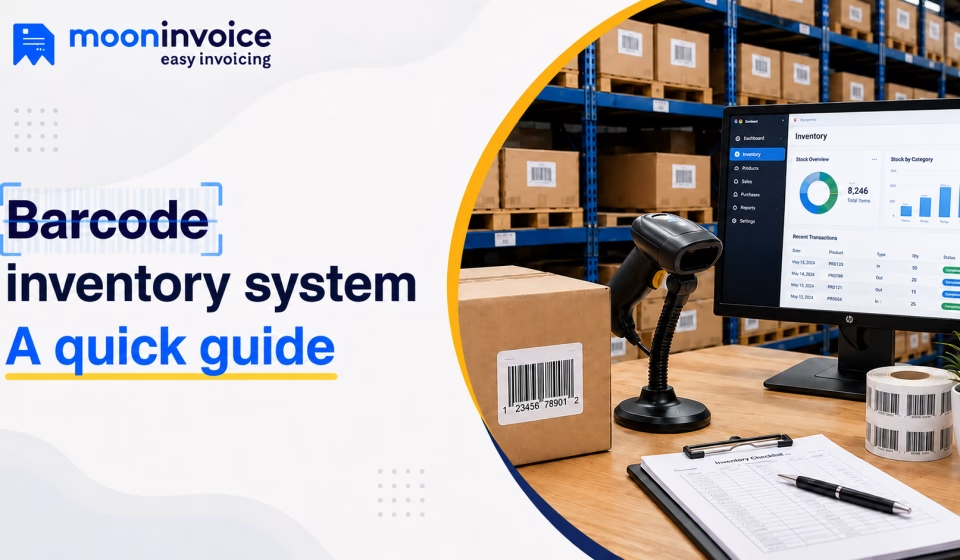
A barcode inventory system refers to an automated software that allows users to generate, print, and track barcodes in a bid to streamline inventory management. Basically, it is a combination of hardware plus software that relies on scannable codes to track products and check inventory levels. Once generated using the system, a physical label is attached to the product to track its movement and update stock levels in real time.
Does your business really need a barcode inventory system?
If you are only selling a handful of products out of a home office, a basic spreadsheet might serve you just fine. But as soon as your sales volume grows, you need a robust barcode inventory system.
So, in case you find your business hitting any of these common tipping points, you need a barcode inventory system:
- You think an item is available, but when an order comes in, the shelf is empty, leading to lost revenue.
- Staff accidentally pick or pack the wrong size, color, or model, resulting in high return costs.
- Your team has to close down operations or spend late nights manually counting every single item in stock.
- You sell online and in person, but manual updates cannot keep up with sales in real time, causing you to accidentally oversell.
Stop guessing your stock levels
Switch to Moon Invoice and get real-time low-stock alerts before you run out.
How does a barcode inventory system work
1. Generating & printing barcodes
Wholesalers start generating unique barcodes through an online barcode generator or POS billing software. Once generated, the code is then assigned to each item available in the warehouse. Remember, the code consists of a scannable pattern of lines or squares, which is later printed using a regular or thermal printer.
2. Labeling available stock
In the next step, those printed labels are attached to your products, packaging, or shelf bins where items are stored. This physical tag is what connects the item on your shelf to your barcode inventory system. This means your staff doesn’t have to memorize names or hunt for serial numbers.
3. Scanning at touchpoints
Now, when an item moves out of the warehouse, it goes under the scanner (handheld device) to read the code in a fraction of a second. This practice is followed whenever any item changes hands or locations. By doing so, your team assures nothing gets lost or unaccounted for.
4. Updates in real time
The moment a barcode is scanned, your inventory software gets to work in the background. The system automatically updates your stock levels across the entire system without anyone needing to type a single number. If you just sold an item, your stock count drops; if you received a delivery, it goes up.
How to set up a barcode system for small business
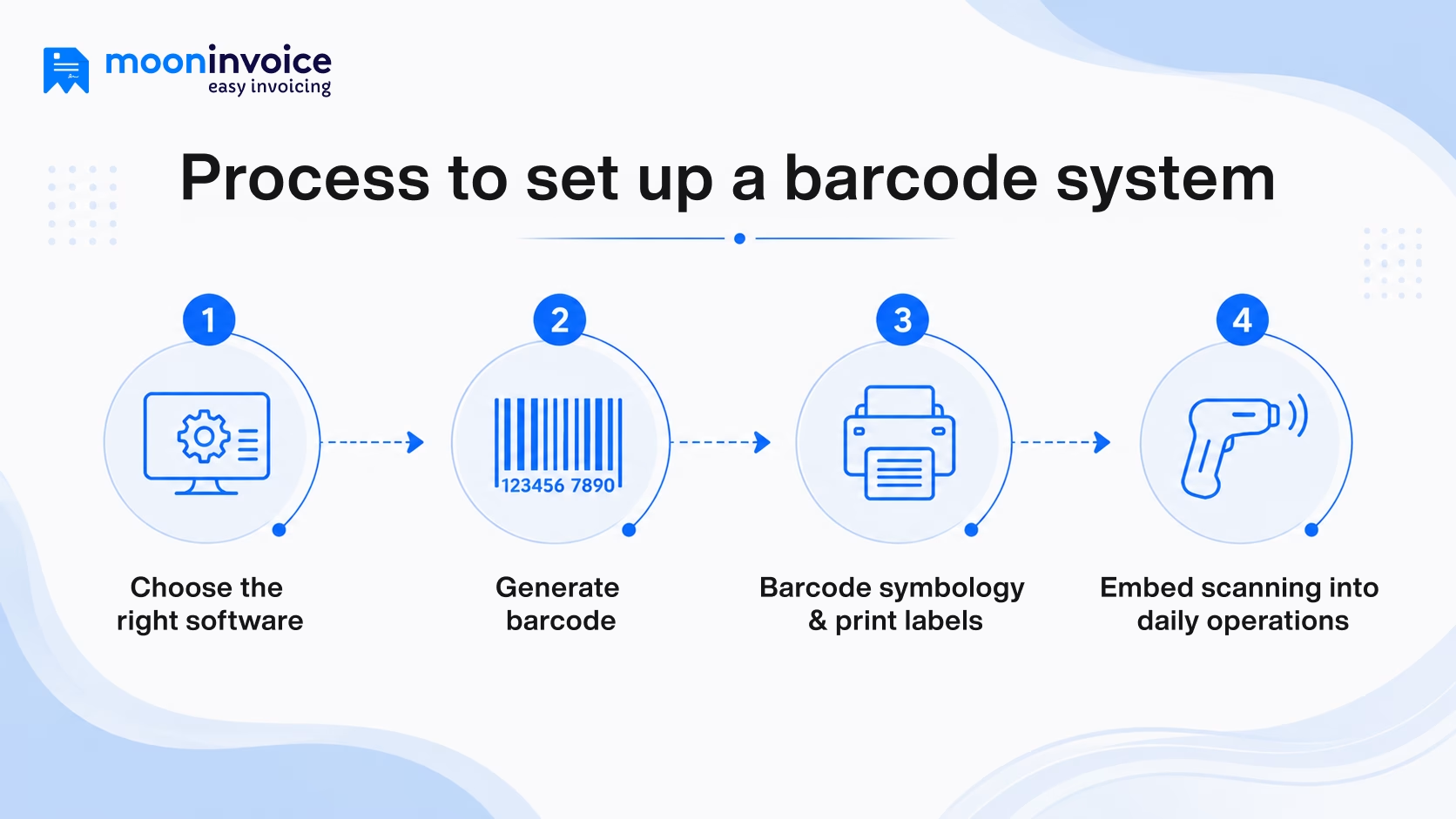
Now that you know how the system works, let’s learn how to set it up.
1. Choose the right software
Whichever software you choose serves as the main handler of your entire operation. Therefore, make sure you pick the right one. Especially if you’re just starting out, choose a solution that gives you essential barcode features without overpaying for enterprise features you don’t need. Built-in barcode generation, integration capabilities, and ease of label printing are a few things to explore when choosing the right inventory software.
If you are not sure which one to choose from the wide range of options available online, we have narrowed it down to the top barcode inventory platforms.
Popular barcode inventory management software options for small businesses
- Moon POS: It is the best inventory solution for small businesses and retailers looking to generate custom barcodes, scan items, and automatically update stock levels. Moon POS is the cost-effective barcode inventory management software.
- Zoho Inventory: A cloud-based inventory management platform built is perfect for growth-oriented businesses. It offers batch tracking, supports multi-warehouse stock movements, and even integrates with the rest of the Zoho business suite.
- Fishbowl Inventory: It is a stock and asset management solution designed for manufacturing, distribution, and warehouse-heavy operations. With Fishbowl Inventory, small businesses can handle serial tracking and manage Bills of Materials (BOM).
- inFlow Inventory: An inventory management platform known for its intuitive interface and rapid hardware setup. inFlow Inventory comprises effortless barcode label creation and end-to-end tracking for reordering and order picking.
- Lightspeed: This is a retail point-of-sale and stock management system, meticulously built for brick-and-mortar stores and boutique chains. Using it, your staff can generate custom product labels and track vendor master catalogs.
2. Generate a barcode
At this stage, assuming you have already adopted software, the next thing you do is start generating printable barcodes. A software takes care of creating the visual barcode image, of course. But it’s you who decides what type of code best fits your business model. Below are the standard types of barcodes usually preferred by businesses when creating barcodes.
- 1D Barcodes: The classic black-and-white vertical stripes you see on grocery items is what considered 1D barcodes. They hold a basic string of numbers or letters.
- 2D Barcodes: Small scannable squares that hold significantly more information in a compact layout are 2D barcodes. Generally, they consist of batch numbers, expiration dates, and serial tracking details.
3. Barcode symbology & print labels
Finalize the barcode style (in technical terms, symbology) before you get your barcode labels printed. Simple black-and-white lines like UPC or Code 128 work best for tracking item numbers and are usually preferred by small businesses. However, if you need more details, then 2D QR codes are the best alternative option.
When printing labels, thermal printers are ideal because they don’t rely on ink and generate stickers that won’t fade in a dusty warehouse. Just be sure to test-scan a sample sheet first to make sure your scanner reads the physical labels cleanly before you print a huge batch.
4. Embed scanning into daily operations
The last step is all about making scanning a part of your daily workflow. A practice that automatically records the stock movement. If new inventory arrives from a supplier, staff should scan items as they unpack them in order to log incoming stock. Similarly, when items are moved to different locations or pulled to fulfill customer orders, a quick scan keeps your digital records perfect.
When such things become a habit, human error drastically drops, improves inventory accuracy, and you never have to leave your inventory to chance.
Main benefits of using barcode inventory management software
Adopting a system does far more than just eliminate hand-written clipboards. Below, we look at the benefits of how a barcode inventory management system makes a difference.
1. Reduced inventory counting errors
With the right barcode inventory management system, you don’t get typos, misread SKU numbers, and misplaced stock. It allows you to scan a label to log the exact product code in your system with greater accuracy.
2. Complete stock visibility
Adopting inventory software is the only way to get complete visibility of stock levels. This visibility is so important during peak season to tackle customers’ rising demands and make sure nobody returns empty-handed. It helps you find the right time to restock products.
3. Faster order fulfillment
The automated software, when used for tracking inventory, can accelerate order fulfillment and checkouts. Since staff scan items directly instead of updating spreadsheets by hand, stock counts update in real time and customer wait times drop.
4. Low-stock alerts
One of the major perks of relying on automated inventory software is that you can enable/disable stock notifications. Once enabled, the software will send reminders to notify you about products running out of stock. It is a highly sought-after benefit for busy retailers and checkout staff.
Manage inventory smarter with Moon Invoice
Running a retail business is already hard enough; your stock room should be making your job easier, not harder. And therefore, replacing manual clipboards and error-prone spreadsheets with the right barcode inventory management system makes complete sense.
Moon Invoice makes this transition effortless by bringing everything you need into one POS platform. Retailers and warehouse managers can make the most of a built-in Barcode generator to simplify inventory tracking. On top of that, retail businesses get AI-first features like an AI product image generator and AI contact creation that instantly adapts to your needs.
With the right barcode inventory software, inventory stops being a stressful chore and becomes a reliable growth engine for your daily operations.
Tracking stock the hard way?
Try the simplified way by adopting Moon Invoice and get full visibility into your product inventory.
Barcode generator
Thermal printer
Low- stock reminders
Barcode inventory system FAQs
How much does a barcode inventory system cost?
Which is the best barcode inventory system?
What are the top features to look for in a barcode inventory system?
Where can I find reliable barcode scanners for inventory tracking?
Do I need expensive hardware for barcode inventory?



Jayanti Katariya is the founder & CEO of Moon Invoice, with over a decade of experience in developing SaaS products and the fintech industry. He holds a degree in engineering. Since 2011, Jayanti's expertise has helped thousands of businesses, from small startups to large enterprises, streamline invoicing, estimation, and accounting operations. His vision is to deliver top-tier financial solutions globally, ensuring efficient financial management for all business owners.