

Every time you deliver projects on time, you deserve to receive payments for them. Similarly, clients deserve to know what they are paying for while making the payment. Sending a bill by just adding up the grand total is not how a bill should be. It leaves a negative impression and raises a lot of questions.
The continuous back-and-forth changes, confusions, and clarifications could eat up a lot of time that you can put into other productive parts of your business.
So, what’s the solution? How to create a bill that clearly breaks down every small to large cost without causing confusion? The answer is: an itemized bill.
Let’s understand what is an itemized bill, what information it includes, and most importantly, how to create one!
📌 Key Takeaways
- An itemized bill is a detailed bill that lists each item the customer has been charged for.
- Itemized bills help ensure transparency, reduce disputes, and improve record-keeping.
- An itemized bill includes CPT and ICD codes, which are rare on standard invoices.
- To create professional, itemized bills, consider using reliable billing software instead of creating bills manually.
What is an Itemized Bill? (Itemized Bill Meaning)
It is a billing method that lists every single detail, i.e., product or service, that is used to successfully complete a job. It lists each item separately with its description, quantity, unit price, and total cost. Unlike regular invoices, which highlight only a single total amount, itemized bills provide a detailed breakdown of each cost, so customers can easily understand what they are being charged for.
Itemized billing is widely used by healthcare providers, service-based businesses, contractors, and consultants, in which a single bill consists of charges for multiple items.
For example, in healthcare businesses, itemized bills are commonly used because they include specified sections such as CPT (Current Procedural Terminology) and ICD (International Classification of Diseases), which represent diagnoses, symptoms, tests, or services provided. CPT and ICD codes play a key role in medical insurance reimbursement.
Wasting Hours to Create Itemized Bills?
Stop following traditional billing procedures that kill your productive time. Switch to Moon Invoice today and create bills in seconds.
Itemized Bills vs Regular Invoices
The terms “bill” and “invoice” are often used interchangeably in business transactions, and they essentially mean the same thing. However, there are some differences between itemized bills and regular invoices.
Let’s find out what these differences are below:
| Factors | Itemized Bills | Regular Invoices |
|---|---|---|
| Level of Detail | Every product or service detail is listed separately | May show only total or general description |
| Transparency | High transparency with full cost breakdown | Limited transparency |
| Customer Understanding | Easy to review and verify charges | May require clarification |
| Dispute Handling | Reduces billing dispute | More chances of confusion |
| Suitable for | Multiple services or complex pricing, such as medical bills or hospital bills | Simple or single-item transactions, such as a retail store’s bills |
| Professional Appearance | More detailed and professional | Simple and minimal |
| Invoice Tracking | Easier to track individual charges and billing history | Limited visibility into individual charges |
Importance of Itemized Billing
Before understanding what an itemized bill includes, you first need to know its importance in businesses. As a business owner, you should create a bill with properly justified charges. It helps earn customers’ trust and helps you collect payments faster.
1. Increased Transparency
The detailed breakdown of charges for each item makes it easier for customers to understand what they are paying for. Clearly specified descriptions, quantities, pricing, and additional fees in different columns eliminate confusion. This increased transparency supports strategic financial decision-making.
For example, in medical billing, each patient receives a detailed list of services, tests, and medications. It helps verify charges, identify eligible costs, and patients can deduct medical expenses for reimbursement or tax purposes.
2. No Disputes
As every charge is listed individually, it helps businesses and customers to quickly review and verify billing details. It reduces frequent changes in the financial document and speeds up issue resolution.
For example, if a patient claims health insurance to a health insurance company, the itemized bill will confirm that the patient has been diagnosed with a medical issue and has covered services.
3. Better Record-keeping
Whether it is a large business or an SMB, itemized billing helps every business maintain accurate financial records by documenting each product or service separately. Detailed records help you track expenses, plan budgets, or generate reports more effectively.
For example, a large production business uses itemized billing, i.e., separately lists raw materials, labor hours, packaging, and logistics costs. It helps the business evaluate production expenses, maintain accurate records, and identify areas where costs can be optimized.
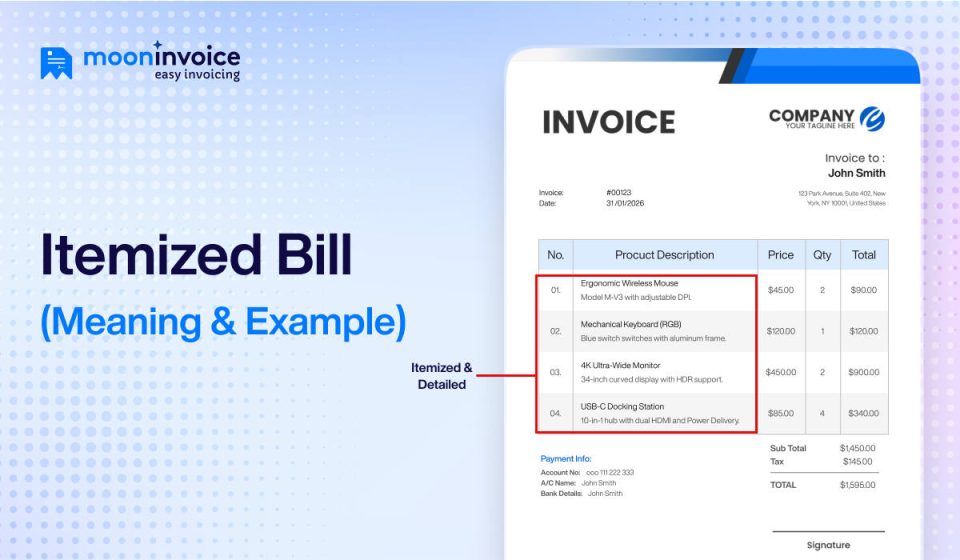
What Does an Itemized Bill Look Like?
Itemized bills come with more detailed information and varying formats based on the type of industry. Below is an example of an itemized bill of healthcare, which clearly explains the itemized bill meaning in detail.
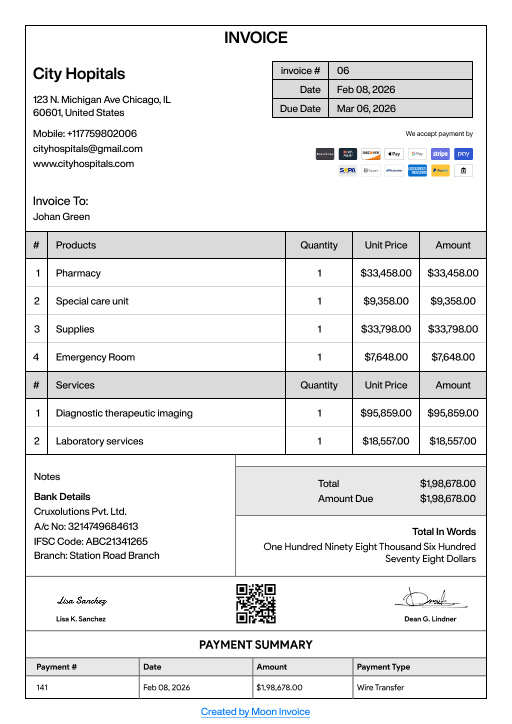
Now that you know what an itemized bill looks like, let’s find out what information it includes.
What Should an Itemized Bill Include?
An itemized bill includes many rare pieces of information that are commonly not found in standard invoices.
Here are the following informations an itemized bill must include:
- Business Information of the Sender: Business name, logo, address, phone number, and email of the sender must be included.
- Customer Details: The client’s name, company name (if available), billing address, and contact information must be included.
- Invoice or Bill Number: A unified invoice number or bill number must be included on every itemized bill so that tracking and recordkeeping become easier.
- Invoice Date: Specify the date the bill is issued to determine accurate payment timelines.
- Service or Product Description: List every item separately with a properly defined description. For example, you can include service type, product name, project phase, work performed, etc.
- Quantity: Specify the correct quantity, i.e., how many units were provided, number of items, or service sessions.
- Unit Price: Mention price per item, hour, or service so that it becomes easier to understand how each charge is calculated.
- Line Total: The total amount for each item (Quantity x Unit Price) must be mentioned to understand individual costs.
- Subtotal: The cost of each item must be totaled before applying taxes, discounts, or any additional charges.
- Taxes: Add applicable taxes, such as sales tax or VAT, without any errors to ensure transparency.
- Discounts (If Any): List any kind of promotional discounts, loyalty rewards, or negotiated price adjustments.
- Additional Charges: If applicable, must mention shipping charges, handling charges, service fees, or late fees.
- Grand Total: Include additional charges, sum all totals, and add the final price that the customer will pay.
- Payment Terms: Mention due date, payment terms (e.g., Net 7, Net 30, or 2/10 Net 30), and late payment conditions.
- Acceptable Payment Methods: Specify payment methods your business accepts, such as bank transfer, ACH, credit card, PayPal, Apple Pay, etc.
- Notes or Additional Information: In this section, you can include warranty details, service summary, refund policy, or thank-you message.
How to Create an Itemized Bill?
If you are struggling to create an itemized bill for your business, here are a few simplified steps to follow.
1. Choose a Reliable Billing Software
The first step in creating an itemized bill is choosing billing or invoicing software for your business. In the era of technical advancement and AI, traditional billing methods are outdated and difficult to manage. When you use billing software, it becomes easier to create, manage, and track the payment history of each bill.
2. Go to Invoice Module
Once you choose your billing software, next you need to go to the invoice module and get started with creating your itemized bill. Make sure you fill in the necessary business information and vendor details in this step. In the itemized bill, you should include details such as vendor name, business name (if applicable), address, and contact information.
3. List Items in Order
After filling in vendor details, next, you need to list all items in order. Priority should be to list all items with their descriptions, quantities, unit prices, and totals in separate columns. Items should be listed in a structured manner so that customers can review them quickly.
4. Calculate Grand Total Automatically
Once you complete listing items in order, the next step is calculating applicable taxes and additional fees. If there are any discounts or rewards, you need to specify them in separate entries. Once done, the software will automatically calculate the grand total that the customer needs to pay.
5. Review and Finalize
After filling in all details and highlighting the grand total, you need to review and cross-check that all information is correct. By doing this, calculation errors or typing mistakes can be addressed immediately. Once the review is complete and everything is correctly specified, you can finalize the itemized bill, i.e., ready to be shared.
Create Itemized Bills Without Frequent Revisions
Generate professional-looking itemized bills effortlessly with Moon Invoice
Create Bills
Track Payments
Generate Reports
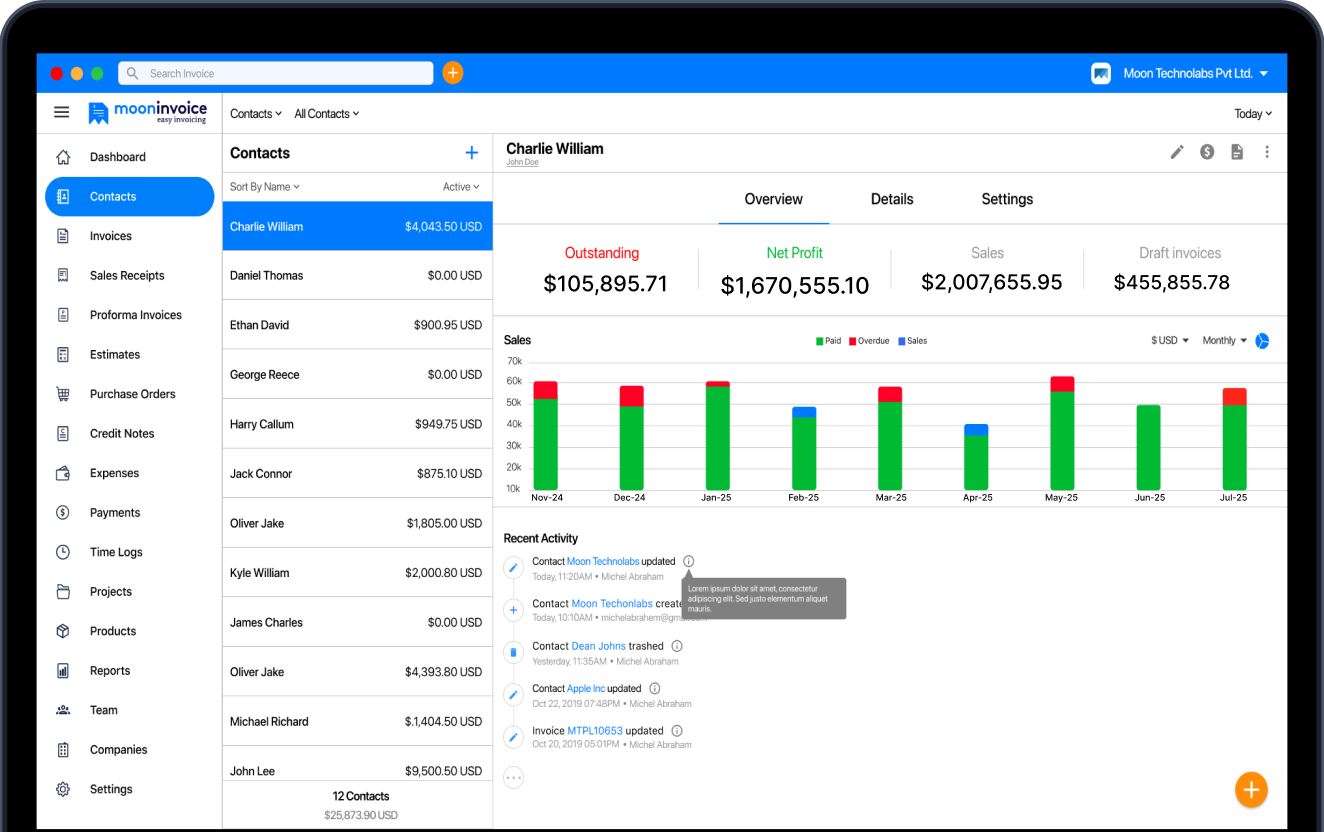
Create Top-Tier Itemized Bills with Moon Invoice
An itemized statement or bill is one of the most essential financial documents for maintaining accurate financial records. When businesses rely on regular invoices, they often miss a detailed breakdown of products or services provided, which can create confusion in accounting, tracking charges, and verifying transaction details.
So, what should you do? Look for a reliable solution like Moon Invoice to create itemized bills without extra effort. It comes with an AI-powered quick scan and customizable templates that reduce manual hassle.
Create quick, error-free itemized bills with ease. Start your free trial today!
FAQs
What is an itemized bill in healthcare?
What is an itemized bill for a claim?
What is an itemized bill of sale?
Is an itemized bill legally required?



We at Moon Invoice, are the best minds behind smarter invoicing and seamless business growth. We love to solve financial problems and keep providing effective tips through our blogs, newsletters, and social media channels. As a team, we continue exchanging ideas about growing financial challenges and smart use of automation tools.