

You’ve successfully catered an event. Now it’s time to get paid. But creating a professional catering invoice that accurately lists every menu item, staffing charge, rental fee, and tax can be overwhelming if you don’t have the right format.
In this guide, we will explore how to create a catering invoice step by step, discover the benefits of using a dedicated catering invoice template instead of a generic invoice, and avoid common billing mistakes that can delay payments or reduce your profits.
Let’s get started without wasting any time…
📌 Key takeaways
- Invoices used by catering service providers or businesses to collect payments from customers are called catering invoices.
- Catering businesses can create digital invoices using advanced tools, such as invoice generators.
- Using a dedicated catering invoice reduces billing errors and improves cash flow compared to standard invoices.
- Not including event details and missing itemized charges are two common mistakes to avoid when creating catering invoices.
What is a catering invoice?
A catering invoice is a financial document that catering businesses and service providers use to request payment for catering services provided to a client. It is issued after completing an event, such as a wedding, corporate gathering, birthday party, or other special occasion, and serves as an official record of the transaction.
A well-structured catering invoice helps caterers bill clients accurately, maintain transparent pricing, and simplify payment collection. It also serves as an important business record for bookkeeping, tax reporting, and resolving billing disputes.
Manually itemizing culinary packages?
Let software do the hard yards. Switch to Moon Invoice to create error-free catering invoices in seconds.
Steps to create a catering invoice
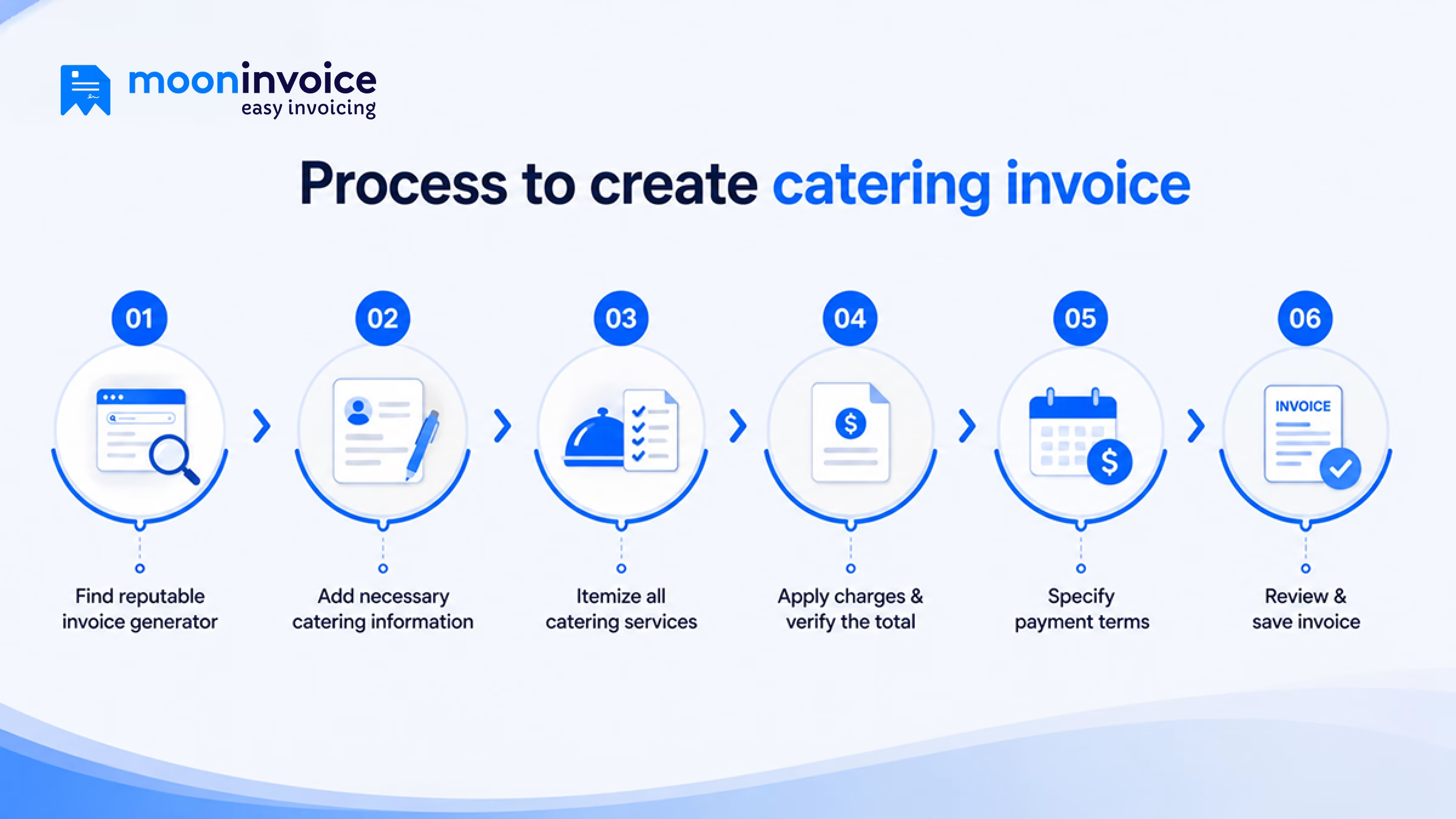
Creating a catering invoice for your business is easier than you think. Follow these six simple steps to generate accurate, professional invoices that ensure your catering business is paid on time.
Step 1: Find a reputable invoice generator
To create a catering invoice, you don’t need to install software or go through complex configurations. All you need to do is search for a reliable invoice generator in your browser, choose a customizable catering invoice template, and start editing it.
Generally, reputable invoice generators allow you to customize the catering invoice template with your business logo, brand colors, and custom fields. It helps you create professional catering invoices faster than paper-based processes.
Step 2: Add necessary catering information
Next, you should enter all essential information for both your catering business and your client. Start by adding your catering brand at the top. Include your catering business name, commercial kitchen or office address, contact number, business email, and company logo.
After that, add your client’s contact info alongside specific event details:
- Client information: Client name, billing address, phone number, and email.
- Event details: Event date, venue address, and event name (e.g., “Smith Wedding Reception”).
- Invoice details: Unique invoice number, issue date, payment due date, and accepted payment methods.
Adding all this information keeps records organized and reduces back-and-forth checking and verification.
Step 3: Itemize all catering services
Now, the next step is to list the catering services in an itemized format. Itemizing each service helps clients clearly understand what they are being charged for. Itemize every menu item, considering their quantity, unit price, and applicable taxes.
Clearly list line items across categories such as:
- Plated dinners & buffets: Specify whether it was a formal 3-course plated meal, a self-serve buffet, or family-style dining, along with the per-person cost.
- Cocktail hour & Hors d’oeuvres: Itemize passed appetizers, charcuterie boards, or bite-sized offerings served before the main meal.
- Casual catering & platters: Break down boxed lunches, gourmet sandwich platters, or family-sized salad bowls for corporate or daytime events.
- Labor & rentals: Include non-food costs like chef fees, bartender hours, tableware, and equipment rentals.
Step 4: Apply charges and verify the total
Next, start adding the service charges, applicable taxes, and also apply discounts (if any). As soon as you are done adding all of them, the total amount will be automatically calculated, so you only need to take a glance. In case you are using a reputable invoicing platform, Moon Invoice, there is no room for numbering errors. All you get is an accurate total amount that no longer needs adjustments.
For example, suppose you catered an event for 100 guests and charged $45 per person for a 3-course plated dinner, $15 per person for hors d’oeuvres, and $110 per platter for 23 gourmet sandwich platters.
So, in this scenario, the subtotal will be $8,530 (excluding taxes). Now, if a sales tax of 7.25% is applied to the amount, the total will be automatically displayed as $9148.93.
Step 5: Specify payment terms
After finalizing the total amount, the next step is to specify payment terms clearly. You need to clearly specify payment terms such as Net 15, Net 30, or 2/10 Net 30, along with late payment policies.
If the client is unable to make payment within the specified timeframe, it could result in late fees, penalties, or other applicable charges mentioned in the payment terms. When payment terms are clearly stated, you can expect on-time payments.
Step 6: Review and save the invoice
Before saving the invoice on your device, do a double-check from the top of the invoice, i.e., date, invoice number, to itemized charges, totals, and payment terms. This will ensure the invoice is accurate and key information is not missing.
After reviewing everything, you can download the invoice in your preferred format (PDF, Excel, Word, or Google Sheets).
Catering invoice example
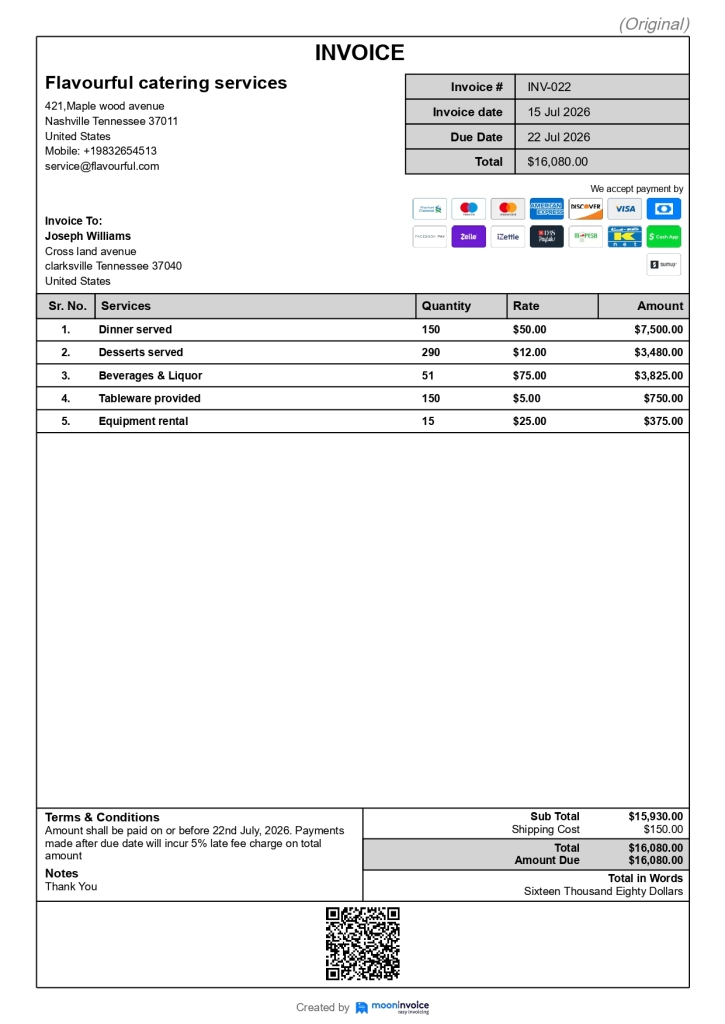
The following is a quick view of what a wedding catering invoice looks like when created using an invoice generator:
Benefits of a dedicated catering invoice template
Catering service providers should use dedicated catering invoice templates rather than regular invoices, as they offer multiple benefits. Let’s explore all the key benefits of using a dedicated catering invoice template:
- Ready-to-use format: Each section of the invoice is pre-designed for catering services. You only need to enter the event-specific details rather than create an invoice from scratch.
- Consistent & professional invoices: Including event-specific details, along with the business logo and brand colors, gives a professional appearance and helps reinforce brand identity.
- Accurate breakdown of items: A dedicated template helps present every service in a clear, itemized format. You can add per-person meal charges and labor costs, which makes the invoice more transparent.
- Faster payment collection: Structured invoices help clients review and process payments faster. It addresses issues related to payment terms and net balance due, and helps clients make payments promptly.
Mistakes to avoid when creating a catering invoice
Even minor invoicing mistakes can lead to disputes and eat up profitable income. If you use catering invoice software to create invoices, avoid the following mistakes to make it accurate and professional.
Mistake 1: Not including event details
A catering invoice includes additional information, such as event details (e.g., event date, venue, occasion). Not including these on the invoice could cause confusion if your client has booked multiple events. When you create invoices, make sure all event details are included correctly so you have a clear record of the services provided.
Mistake 2: Missing items in itemized breakdown
In catering services, the list can be long, and you may miss adding items to the itemized breakdown, such as food, beverages, or rental equipment. This can lead to underbilling and reduce your overall revenue. Some businesses also forget to do a final guest count, which results in incorrect per-person charges and later affects profitability.
Mistake 3: Sending invoice late
The more you delay sending invoices, the longer you will have to wait for payment. Not sending an invoice soon after the event is one of the most common mistakes in catering businesses. You should send an invoice once the event ends and offer multiple payment options so you can receive payments faster.
Mistake 4: Ignoring last-minute charges
Last-minute requests are very common in catering services that are provided beyond the agreement. If you do not include those additional charges, extended service hours, or deliveries, you may lose some part of your revenue you have already earned.
Mistake 5: Using unprofessional invoice formats
Some catering businesses just rush through the entire invoicing process and tend to choose any format for collecting payment from customers. This is considered a mistake, as an unprofessional catering invoice format can make your business appear less credible. Not using professional invoices may delay customer payments.
Create professional catering invoices in minutes.
Let Moon Invoice handle the financial heavy lifting for instant invoice creation.

Customizable templates
Multiple payments
Secure cloud storage
Scale your catering business with a smarter invoicing solution
Creating catering invoices is not as complicated as it sounds, unless you are following a paper-based method. In the current era, when technological advancements are reaching new heights every day, paper-based invoices are not worth the choice. Instead, you should switch to fast, reliable, and error-free digital methods to create invoices for your catering business.
Talking of digital methods, you can consider using reputable invoicing software such as Moon Invoice to create invoices effortlessly. Whether you’re billing for catering services provided or additional services requested during an event, Moon Invoice helps you create detailed invoices with ease. It also helps you collect advance payments for the catering event, ensuring bookings are secured and cash flow is on track.
So, what are you waiting for? Get Moon Invoice for your catering business today.
FAQs
What should be included in a catering invoice?
Can I create a catering invoice online for free?
When should a caterer send an invoice to a client?
How do I calculate catering invoice taxes?


Jayanti Katariya is the founder & CEO of Moon Invoice, with over a decade of experience in developing SaaS products and the fintech industry. He holds a degree in engineering. Since 2011, Jayanti's expertise has helped thousands of businesses, from small startups to large enterprises, streamline invoicing, estimation, and accounting operations. His vision is to deliver top-tier financial solutions globally, ensuring efficient financial management for all business owners.