




High-quality photos deserve timely payments. However, many photographers struggle with inconsistent billing and late payments. This could negatively impact their profession.
One of the simplest ways to streamline billing and get paid with confidence is to share professional photography invoices. It is an essential billing document that photographers send to clients to request payment. A typical photography invoice outlines the breakdown of photography services rendered, associated costs, tax, and payment terms.
This blog will guide you on how to write an invoice for photography services, along with the essential tips you must follow.
How is a photography invoice different from a standard invoice?
Both standard invoices and photography invoices include similar details, such as the invoice number, date, due date, invoice issuer information, and client information. However, the major difference lies in the service-specific charges and line items.
A photography service can be quite broad, covering many different services, including photoshoots, editing, retouching, and image delivery. Additionally, session, equipment used, travel, and usage license are factors that affect photography billing. Therefore, unlike a standard invoice, a photography invoice includes photography-specific billing details to ensure accuracy.
In simple terms, a photography invoice reflects photography-specific charges, whereas standard invoices often don’t cover them.
What to include in a photography invoice?
A typical photography invoice should cover the following details:
- Invoice number
- Date on which the invoice is issued
- Due date
- Photographer/business details (name, address, and contact number)
- Client details (name, address, and contact number)
- Brief description of photography service rendered along with the cost breakdown, hours spent, and tax
- Total payable amount
- Acceptable payment methods
- Terms and conditions
Photography industry insightsAccording to the Precedence Research report, the global photographic services market size is expected to reach 66.8 billion by 2035. This highlights the growing demand for professional photography services.
How do I create a photography invoice?
Creating a photography invoice needs a systematic approach. With a clean and professional document, you can ensure on-time payment. Here are the steps you must follow when thinking about how to write an invoice for freelance photography.
Choose the invoice template
First, choose the photography invoice template that best suits your needs. Look for the color, theme, and overall design to ensure they help create a clear invoice. Also, choose customizable templates that let you create the required invoice.
Add the required details
Once you have selected the invoice template for a freelance photographer, the next step is to add the following details:
Invoice details
The basic invoice details include Invoice number, invoice date, and due date. Make sure to include a unique invoice number for every new invoice. This makes invoice tracking much easier.
Business information
Add your name as the photographer or the business name. Also include the address and contact details. If required, you can also add your business logo to make your business identifiable.
Client information
Add the name of your client to whom you are issuing the freelance photographer invoice. Similar to the field above, you also need to add the client’s address and contact details here. Mention the complete address along with PIN code.
Line item details
Description of offered photography service along with the cost breakdown and applicable tax or discount. It covers session duration, hourly and package rate.
In case of a photography invoice, you may include the following information:
- Photoshoot charge
- Editing charges
- Equipment rental fees
- Travel expenses
- Image delivery charges
- Licensing or usage rights fees
Include acceptable payment methods
Mention the payment modes you accept, such as cash, online payment, card payment, or bank transfer. This enhances payment flow by providing convenience to the client.
Mention payment terms
Include the terms and conditions regarding your payment. You must cover the last payment date, late-fee information, and other relevant details.
Review and send
Once you fill in the details, you must review them. This ensures that the freelance photographer invoice is correct and free from errors. Once the invoice is fully prepared, send it to the client either online or as a hard copy. Keep one copy with you for future reference.
Captured the moments? Now it’s time to bill smartly.
Create your photography invoice in 60 seconds with AI-powered Moon Invoice.
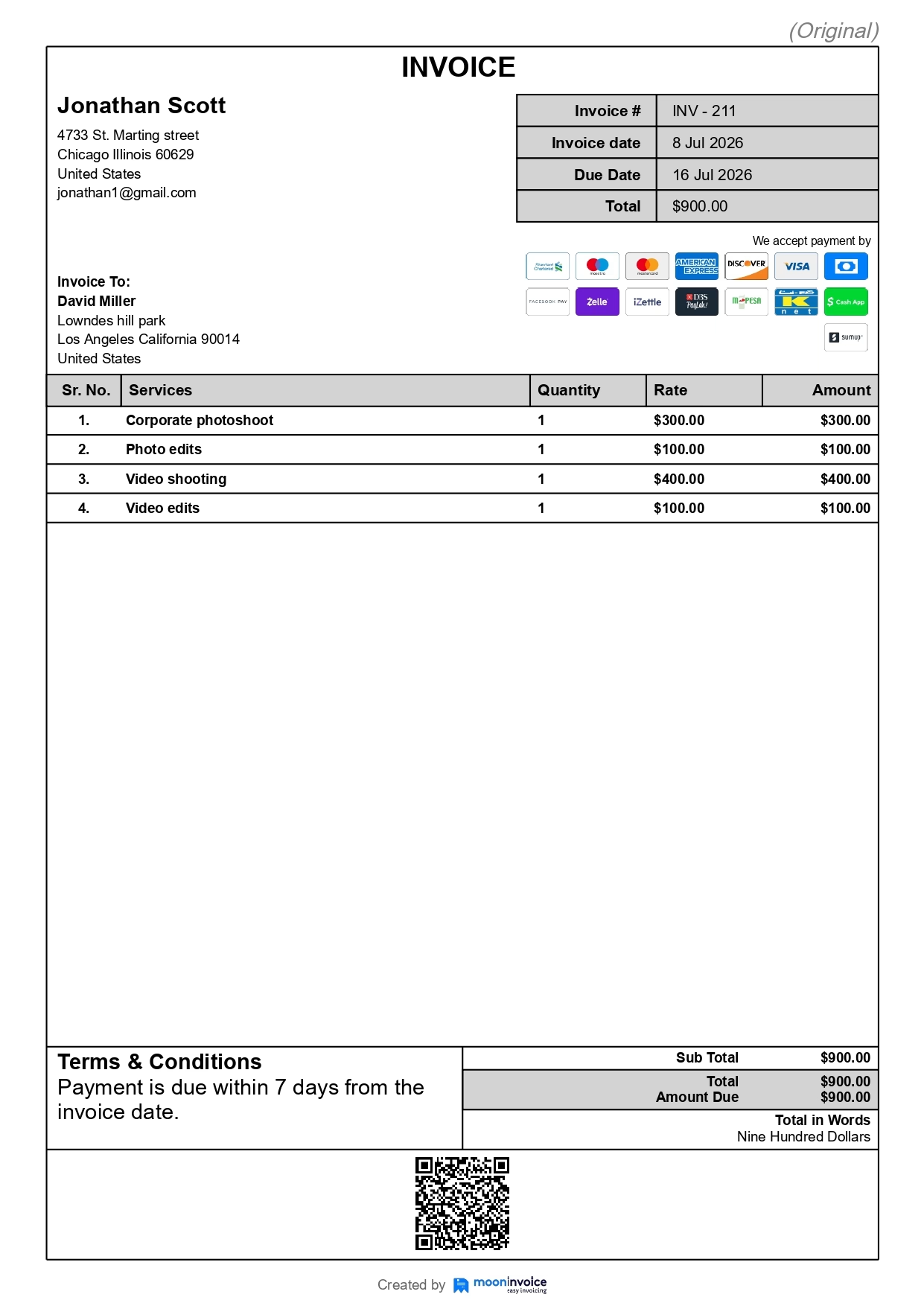
Photography invoice example
If you are unsure what a professional photography invoice looks like, here is an example. It covers all the essential fields and details.
Invoicing tips for photographers to get paid faster
Creating a professional invoice is one part of your billing process. To ensure timely payment, you must adopt these invoicing tips:
Use invoice templates
Photographers should use customizable templates to create professional invoices in less time. These templates help to speed up invoice generation by providing ready-to-use fields. You can also maintain consistency across invoices.
Photography billing software such as Moon Invoice offers a variety of invoice templates, including wedding, pre-wedding, corporate, portrait, and wildlife invoice templates.
Include the relevant information
Always avoid adding irrelevant information in the sample photography invoice. Keep the details relevant, clear, and to the point for the client’s better understanding. Also, ensure you mention complete information. Incomplete details can increase discrepancies, confusion, and impact the payment process.
Send the invoice on time
The longer you delay sending the invoice, the greater the risk of late payment. Therefore, it is essential to send the invoice on time. Send the invoice to the client immediately after the photoshoot to encourage on-time payment.
Clearly outline the payment terms
It is essential to outline the payment terms (Net 15, Net 30, and Net 60) in clear, understandable language. Also, clearly state the key methods for accepting payment and the applicable fees for late payment. In short, clearly mention all the terms and conditions to avoid confusion.
Offer multiple payment options
Allow your client to pay via the most convenient payment method. Instead of relying on a single payment method, it is a good idea to offer multiple options. This increases the chances of on-time payment.
Adopt AI automation
Automation is the right solution for speeding up processes in the modern era. For photography invoicing, you can set up recurring invoicing and automated payment reminders. This helps save time, reduce your workload, and encourage on-time payment of your due invoice.
Follow up on overdue invoices
Regularly follow up on your due invoices. Send a gentle reminder to the client with professional language. It is a good idea to keep a polite tone, reference the invoice number, and highlight the due date. Also, ask the client whether he needs any clarification on the invoice.
How can Moon Invoice streamline your photography invoicing?
Moon Invoice, a leading and trustworthy invoicing software, helps photographers take full control of their billing. A manual approach to invoicing takes time and often leads to human error. Moon Invoice eliminates this issue and leads to systematic and quicker billing through the following features:
- Customizable templates: Quickly create professional estimates and receipts with customizable templates.
- Automated calculations: The invoice templates include an automated calculation feature. This calculates the total amount, including the applicable tax and discount. Thus, there is no chance of errors.
- Recurring invoices: Professionals can easily set up recurring invoices for ongoing photography projects. This keeps the billing on the right track and reduces manual effort. With recurring billing, professionals can easily ensure on-time payment.
- Online payment collection: The invoicing software supports 20+ payment methods, including credit cards, Apple Pay, bank transfers, and more. This allows clients to make payments using their preferred method.
- Payment reminders: The platform supports payment reminders. It allows professionals to easily set a reminder for a specific client. This automatically sends a payment reminder and boosts on-time payment rates.
- AI automation: The AI-powered features of Moon Invoice help to automate many tasks for photographers. With a quick scan, professionals can easily create invoices, receipts, estimates, and POs. Additionally, it is easy to record payments and customer details through the AI. This saves time and reduces manual effort.
- Expense tracking: Photographers can easily record and track expenses such as equipment rental, travel costs, & editing software subscription. The system allows you to set recurring expenses and maintain clear records of expenditure.
- Financial reports: The platform supports 15+ financial reports that clearly represent revenue, outstanding balance, and profit & loss.
- Client management: Manage client details easily on a single platform to maintain systematic records.


FAQs on photography invoice
What payment terms should I use in a photography invoice?
Should image licensing/usage rights be listed on the invoice?
Is a photography invoice legally valid?
Can freelance photographers use invoice software?
How do I invoice clients as a freelance photographer?



Jayanti Katariya is the founder & CEO of Moon Invoice, with over a decade of experience in developing SaaS products and the fintech industry. He holds a degree in engineering. Since 2011, Jayanti's expertise has helped thousands of businesses, from small startups to large enterprises, streamline invoicing, estimation, and accounting operations. His vision is to deliver top-tier financial solutions globally, ensuring efficient financial management for all business owners.